Last we left off, we were discussing asymptotic runtime analysis and its application to several important operations, most recently to sorting and membership search.
While we saw a couple of basic implementations of each using Lists… we should pause and consider: might there be a better way to get the best of both worlds?
In particular, perhaps we’re interested in designing some structure that makes it easy to:
- Preserve some sorted order of its contained items without having to sort a list like with InsertionSort.
- Exploit the performance benefits of binary search (which required a sorted list) for membership search.
- Be able to efficiently add to / maintain a collection that guaranteed the above.
The answer to the above may surprise you… and to detail it, we’re going back to our roots…
Trees: Basics
Before we discuss any specifics of our new data structure today, let’s talk motivation.
Motivation
Thus far, we’ve encountered some ADTs that are useful in scenarios for:
- [Lists] organizing data sequentially.
- [Stacks] organizing data in a FILO order.
- [Queues] organizing data in a FIFO order.
Remark
What we have yet to see is a means of organizing data hierarchically.
Example
Give some examples of reasons we might want to organize data hierarchically (i.e., arranged in some order of non-linear rank).
As such, today, we’ll begin our first look at recursive data structures, starting with Trees.
Definition
Recursive data structures are those that are composed of smaller or simpler instances of the same data structure.
As you might imagine, recursive data structures lend themselves to recursive algorithms that work efficiently in tandem.
We’ll start by defining trees, their properties, and then examine some operations and algorithms that employ them.
Trees
Recall our prototypical picture of Linked Lists:
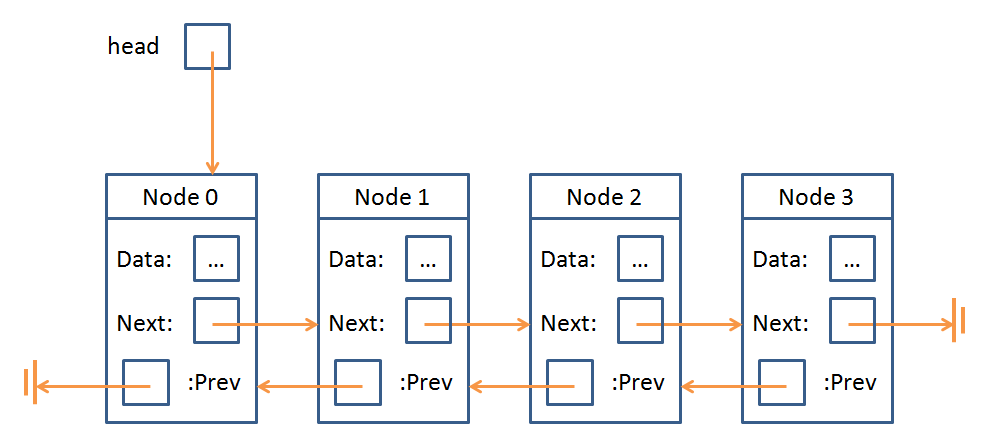
Doubly linked lists consisted of a sequence of nodes with data elements and references to the previous and next node in the sequence.
Indeed, the concept of a Node is something that Trees and Linked Lists have in common:
Remark
A Node is just an object that stores some data as well as a means of accessing other Nodes in the data structure… so we could just as easily use these to represent a hierarchy rather than a list!
The “means of accessing other Nodes” from a Node in a Linked List was to traverse it via fields prev and next; for Trees, it’s only slightly more complicated.
Definition
Trees (in the general definition) possess Nodes with any number of children which are references to the next Nodes lower in the Tree.
…just like a family tree!
Let’s go over some definitions, see a Tree, and then write some code!
Definition
A Tree is an abstract data type consisting of data nodes arranged hierarchically, with a root node possessing some number of references (edges) to other children nodes, who in turn have their own children, etc.
Definition
There are two primary properties of trees: (1) no node’s reference (aka edge) points to the root, and (2) no two references point to the same node.
Components & Definitions
To formalize some of those definitions:
Definition
The root of a tree is a single node that has no inbound edges.
Definition
A leaf node is one that has no outbound edges.
Definition
An internal node has both inbound and outbound edges.
Definition
A subtree is any tree formed from treating a node in an existing tree as though it was the root.
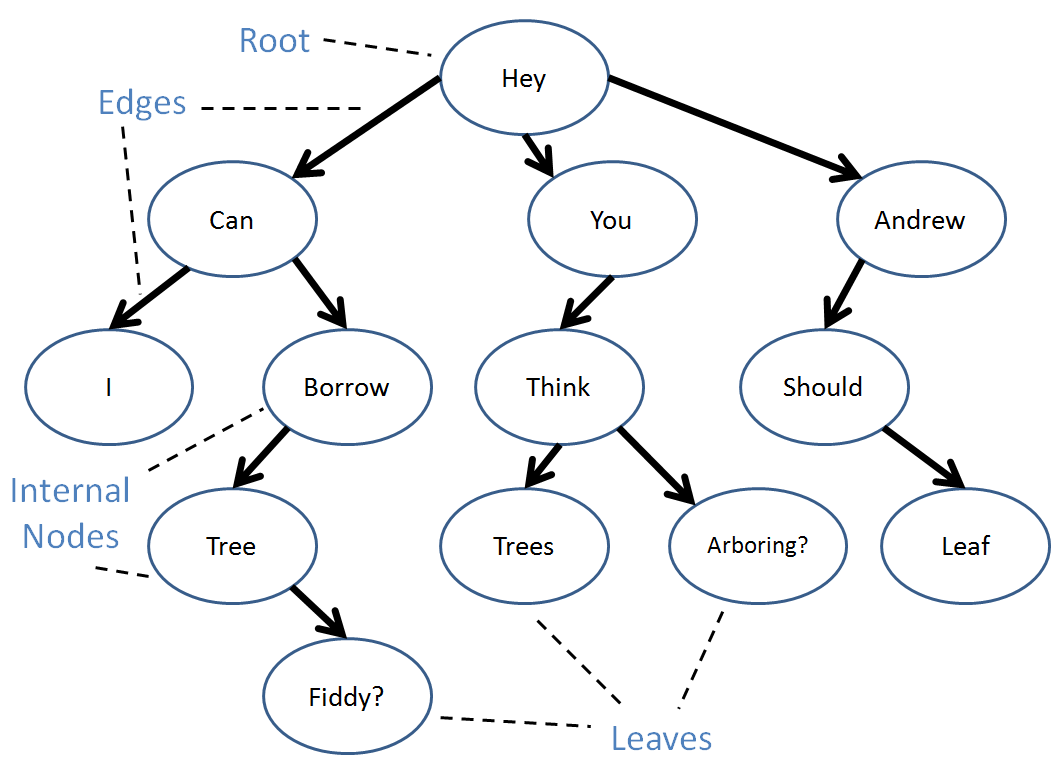
A tree can have duplicate values in its data nodes.
There are also a variety of relationships we can define between nodes:
Definition
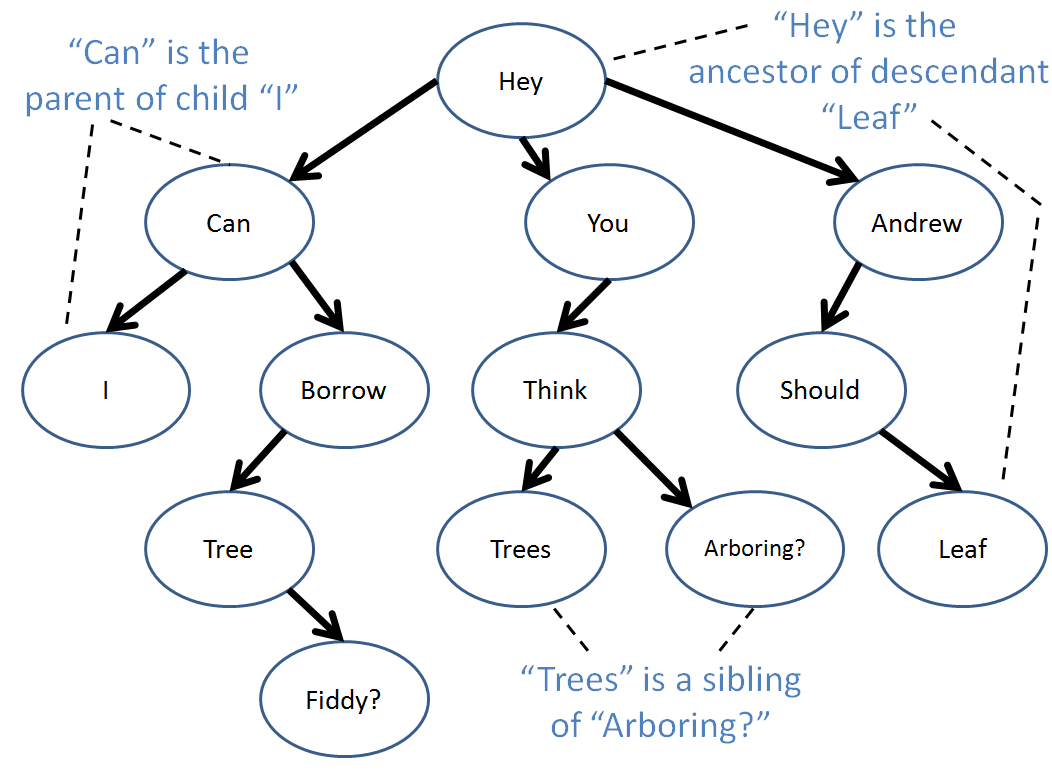
An edge extends from a parent to a child with the arrow pointing to the child.
Definition
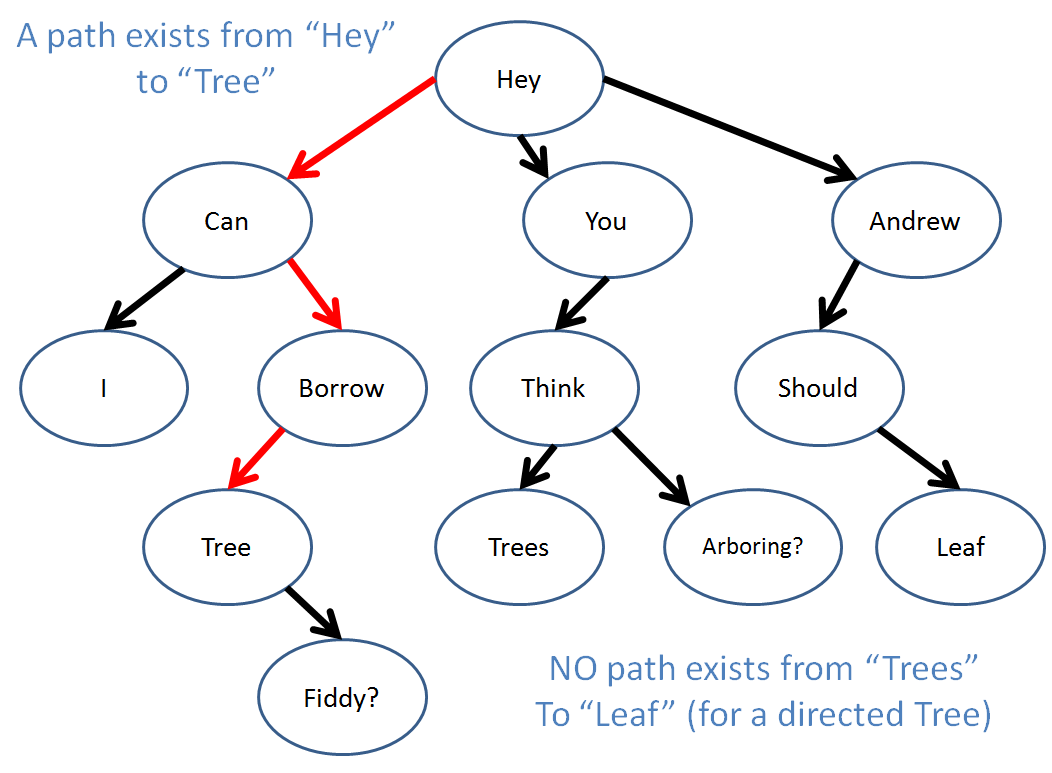
A path is any set of connected, directed edges.
Definition
A descendant of a node A is any node B with a directed path from A to B.
Definition
An ancestor of a node B is any node A with a directed path from A to B.
Definition
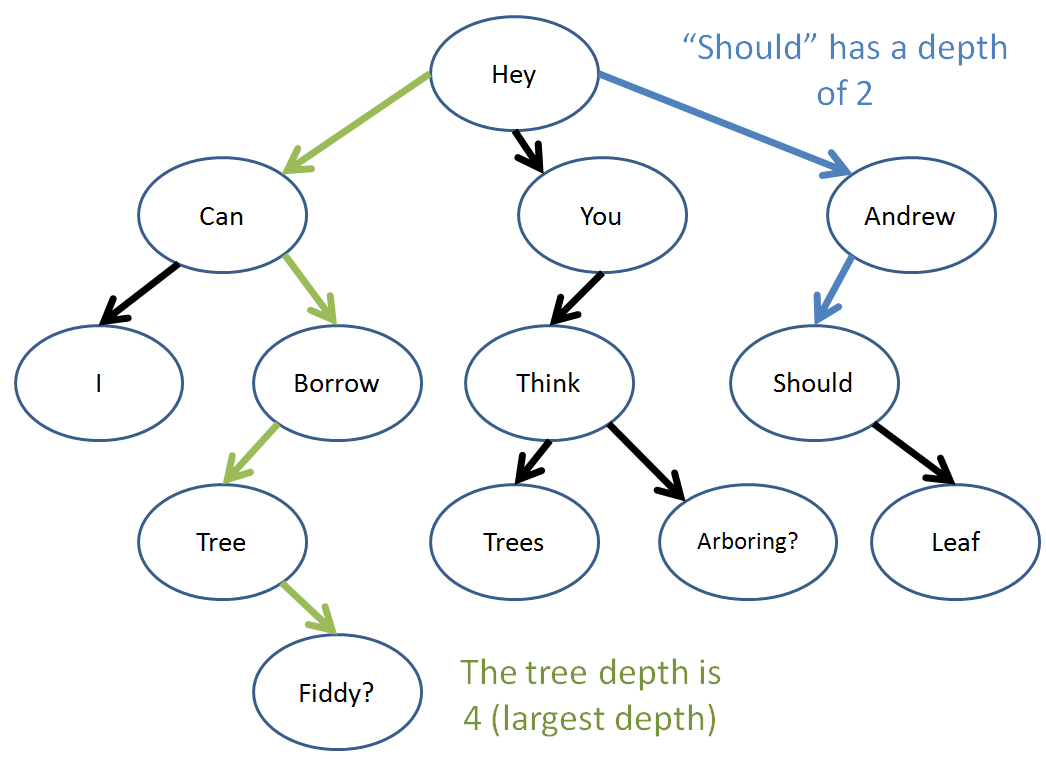
The depth of a node is equal to the number of edges along the path that separate it and the root.
Definition
The tree-depth a given tree is equal to maximum depth of any node in the tree.
Well, those are the tree basics! Let’s look at some code now…
Trees: Implementation
To implement a tree, we first consider the needs of our particular application.
Certain applications require flexibility in the number of children allowed for each node in a tree, while others benefit from restricting these.
We’ll look at some simple implementations of both, and finally, conclude by examining a special type of widely applied tree.
Unbounded Trees
Definition
Unbounded trees are the most general tree types that make no assumptions about the number of children that each tree node is allowed to contain.
This means that every node in our tree can have 1, 5, 100, or even no child nodes, and still be considered a legal tree.
Example
Let’s try to design an
UnboundedTreeNodeclass to create a hierarchical tree structure of ints with an arbitrary number of branches.
Remark
Note: we can implement a tree with its own wrapper class (e.g., UnboundedTree) in which UnboundedTreeNodes would be a data member, but there are some arguments that this implementation is unnecessary since every operation is conducted on the tree nodes themselves.
As such, for simplicity, I’ve elected to demonstrate just the UnboundedTreeNode class, but you should be aware that there are multiple valid design methods
for this structure.
With that said:
Question
What would be a reasonable data structure to choose for storing references to a node’s children? What types of data would it hold?
Answer
A List would be a good choice, though whether you chose a Linked vs Sequential List implementation is application-specific. In either case, we would store references to other UnboundedTreeNodes.
Let’s scaffold how this might look:
package tree.unbounded;

import java.util.ArrayList;

public class UnboundedTreeNode {

    // public fields for illustrative purposes
    public int data;
    public ArrayList<UnboundedTreeNode> children;

    public UnboundedTreeNode (int d) {
        data = d;
        children = new ArrayList<UnboundedTreeNode>();
    }

    public void add (int s) {
        children.add(new UnboundedTreeNode(s));
    }

    public UnboundedTreeNode getChild (int index) {
        return children.get(index);
    }

    public int getInt () {
        return data;
    }

}
That’s uhh… pretty much it.
If we want to use it, we just reference a tree node we want to modify, and then do so!
Example
Draw the tree that results from the following code:
package tree.unbounded;

public class UnboundedTreeExample {

    public static void main (String[] args) {
        UnboundedTreeNode root = new UnboundedTreeNode(5);
        root.add(4);
        root.add(2);
        root.add(1);
        UnboundedTreeNode it = root.getChild(1);
        it.add(2);
        it.add(3);
    }

}
And there you have it! Quite simple.
N-ary Trees
Definition
An N-ary tree is a tree where each node may have at most N children.
This is easy enough to implement in our above class definition for UnboundedTreeNodes; simply verify that the given size of the children field is less
than N before you add another child.
Let’s examine one important N-ary tree: the binary tree.
Definition
A binary tree is a tree with at most 2 children per node.
Generally, we distinguish between each child in a binary tree as the “left” vs. the “right” child, for ease of reference.
Remark
NOTE: Although the above UnboundedTreeNode class might be something you could use as a public class to structure any arbitrary data hierarchically, more often than not, the TreeNodes you use will be private inner classes of another, just like our LinkedList.
Definition
However, just so we’re comfortable dealing with trees and their nodes to begin with, let’s make the following BinaryTreeNode class public with publically visible fields (just for practice).
To implement a binary tree, we need only make a simple modification to the data structure of our unbounded tree:
package tree.binary;

public class BinaryTreeNode {

    // public fields for illustrative purposes
    public int data;
    public BinaryTreeNode left, right;

    public BinaryTreeNode (int d) {
        this.data = d;
    }

}
Above, we elected to represent the user’s interpretation of “left” vs “right” child through the abbreviations “L” and “R” in the add / getChild parameters,
though this could be done a number of different ways.
Now that we have our BinaryTreeNodes constructed, let’s see how to use them:
Example
Draw the Binary Tree that results from the following code:
// ...
public static void main (String[] args) {
    BinaryTreeNode root = new BinaryTreeNode(5);
    root.left = new BinaryTreeNode(4);
    root.right = new BinaryTreeNode(2);
    BinaryTreeNode it = root.left;
    it.left = new BinaryTreeNode(1);
    it.right = new BinaryTreeNode(0);
    it = root.right;
    it.left = new BinaryTreeNode(8);
}
// ...
Trees: Traversal
We’ve already examined some simple tree node addition operations, but now let’s talk about how we might iterate through a tree’s elements.
Definition
Because tree nodes have no clear ordering, there exist several traversal methods for iterating through its individual nodes.
Definition
Traversals give a procedural ordering to the nodes in a tree.
As we mentioned earlier, trees are recursive data structures because each sub-tree is itself a tree. Therefore, we’ll be using recursive algorithms to complete our traversals.
Question
Briefly define what it means for an algorithm or method to be recursive / what are the components of a recursive method?
Answer
The components are:
- Base Cases: return some value or terminate the recursion when some stopping condition is met.
- Recursive Cases: call the same method again, though with different arguments that advance it closer to hitting a base case.
Here’s a very basic, abstract example in Python, but which doesn’t really do anything:
def walk_forward (distance):
    # Base Case: You've reached your destination, done walking
    if distance == 0:
        return
    # Recursive Case: take another step toward your destination
    walk_forward(distance - 1)
Remark
Intuition: For traversing trees (i.e., iterating over its contents), we can try to recursively start at the root, and then “walk” each path down until we hit leaves (base cases where there’s no further to go).
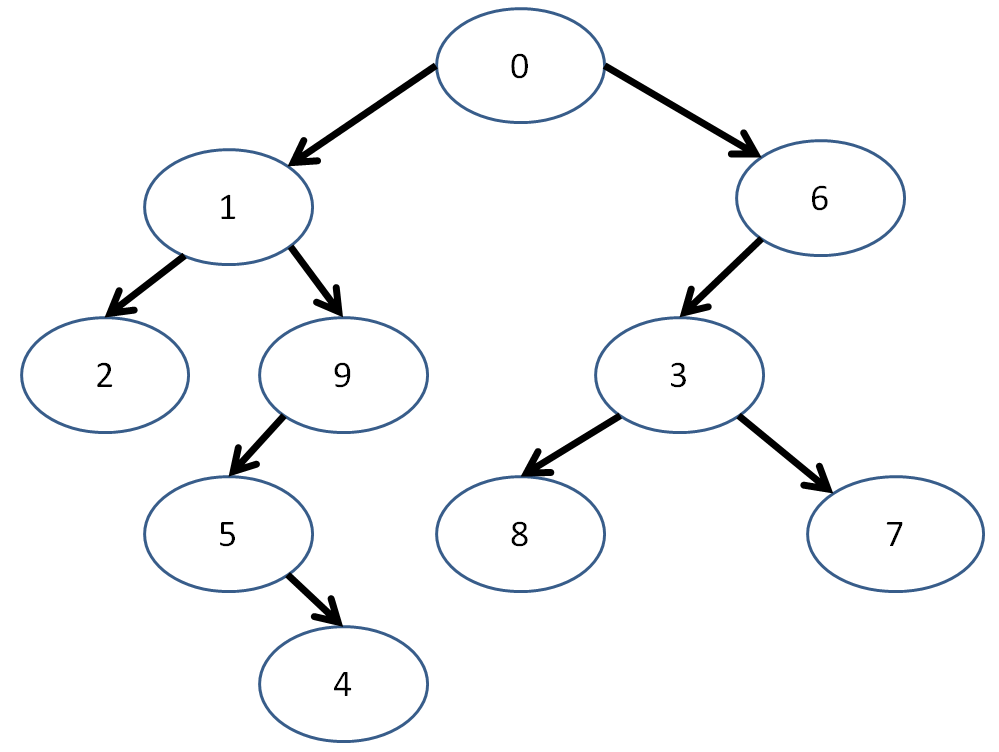
Let’s take a look at a motivating binary tree of ints, and then use it to perform some different traversals:
Pre-order Traversal
The preorder traversal strategy follows these steps:
- Visit the current node (execute desired behavior)
- Visit the left subtree (recursive case)
- Visit the right subtree (recursive case)
The definition of “visit” will depend on your application. For the moment, let’s consider our application to simply print out the data at each node in the given order.
Preorder traversal looks like this:
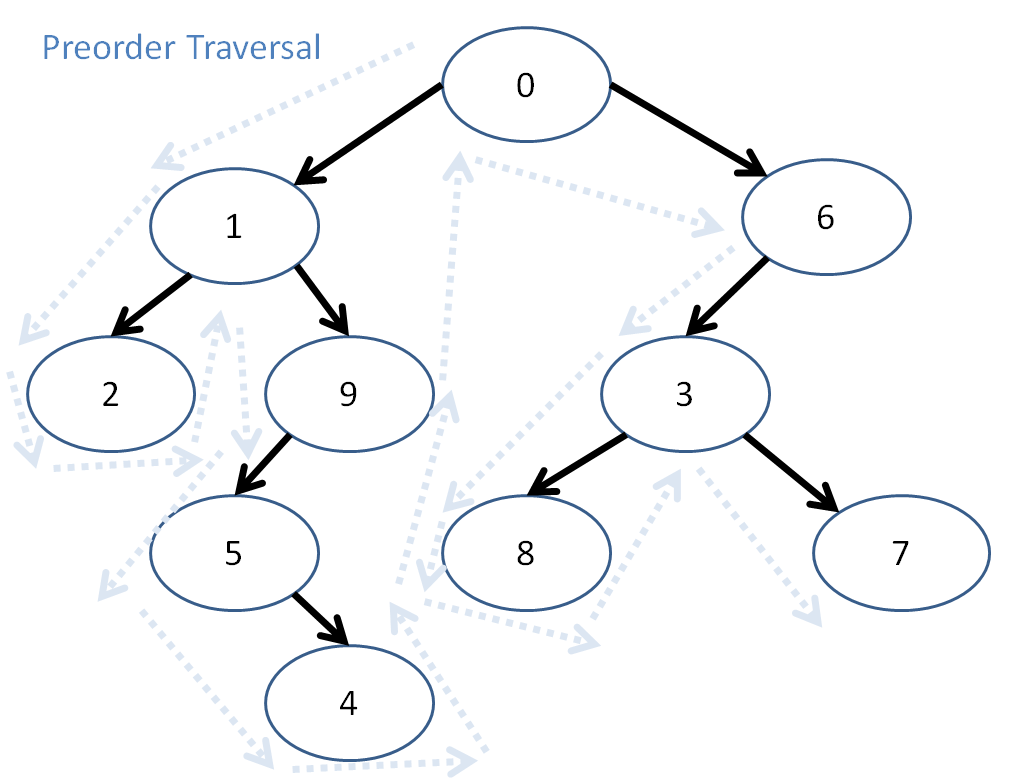
So, here, preorder traversal prints out: 0, 1, 2, 9, 5, 4, 6, 3, 8, 7
Let’s try coding this recursively using our BinaryTreeNode class:
...
public static void preorderPrint (BinaryTreeNode n) {
    if (n == null) {return;}
    System.out.println(n.data);
    preorderPrint(n.left);
    preorderPrint(n.right);
}
...
Example
To really intuit what’s happening above, draw out the call stack for
preorderPrintas it goes through the tree!
Post-order Traversal
The postorder traversal algorithm follows these steps:
- Visit the left subtree (recursive case)
- Visit the right subtree (recursive case)
- Visit the current node (execute desired behavior)
Remark
NOTE: This means, even though we might “pass through” a node, we don’t print it until its left and right subtrees have been processed!
So, what will the postorder traversal of our tree print out?
Question
The postorder traversal prints…
Answer
2, 4, 5, 9, 1, 8, 7, 3, 6, 0
Here is the postorderPrint method:
...
public static void postorderPrint (BinaryTreeNode n) {
    if (n == null) {return;}
    postorderPrint(n.left);
    postorderPrint(n.right);
    System.out.println(n.data);
}
...
In-order Traversal
The inorder traversal strategy follows these steps:
- Visit the left subtree (recursive case)
- Visit the current node (execute desired behavior)
- Visit the right subtree (recursive case)
For completion, here’s that in code form:
...
public static void inorderPrint (BinaryTreeNode n) {
    if (n == null) {return;}
    inorderPrint(n.left);
    System.out.println(n.data);
    inorderPrint(n.right);
}
...
Example
I’ll leave it as an exercise for you to determine the inorder traversal of our example tree ;)
Next week, we’ll examine some common tree applications to see their true power!
Extra Practice
Here are some more practice problems to keep you sharp for your interviews and future tree-based assignments! Let’s practice by adding these as methods on BinaryTreeNodes themselves:
public class BinaryTreeNode {

    // public fields for illustrative purposes
    public int data;
    public BinaryTreeNode left, right;

    public BinaryTreeNode (int d) {
        this.data = d;
    }

}
We’ll start with the biggest cliche interview problem since so many of you have asked for it.
Example
Design a method in the
BinaryTreeNodeclass,public void invertTree (), which is a mutator that reverses the order of all subtrees rooted at the calling node.
root-> 5                     root-> 5
      / \                          / \
     6   9  root.invertTree():    9   6
    / \                              / \
   4   7                            7   4
Example
Design a method in the
BinaryTreeNodeclass,public boolean isBinarySearchTree ()that returns whether or not the given Binary Tree rooted at the calling node would be considered a BinarySearchTree (i.e., have only values in the left subtree that are less than it and only values in the right subtree that are greater for all subtrees).
root-> 5
      / \
     6   9
    / \   \
   4   7   9

root.isBinarySearchTree() => false
root.left.isBinarySearchTree() => true
root.right.isBinarySearchTree() => false
root.right.right.isBinarySearchTree() => true
Example
Design a method in the
BinaryTreeNodeclass,public int sumEven (), returns the sum of all even-numbered nodes rooted at the calling node, including the calling node’s if its data is even.
root-> 5
      / \
     6   9
    / \   \
   4   7   8

root.sumEven() => 18
root.left.sumEven() => 10
root.right.sumEven() => 8