Lecture 8: Enlisted To List! (Part II)
Array Lists - Implementation
Before we start designing our first data structure in class, you should know something…
…these data structures are very popular… so popular, that Java (and most other languages) include packages for every ADT we discuss in this course.
The Java collections framework is a library of implemented collection ADTs, one of which is the
java.util.ArrayListclass (among others).
That said, since this is a course on data-structure first-principles, we will be largely designing these collections ourselves.
With the disclaimer done, let’s summarize our quest:
Example
Design an implementation of the array list ADT that supports dynamic sizing (arbitrary length) and relative item ordering for ints. Call this the
IntArrayListclass.
Here’s an interface to support the basic operations, as noted earlier:
public interface IntList {

    public int  getAt (int index);
    public void append (int toAdd);
    public void insertAt (int toAdd, int index);
    public void removeAt (int index);

}
Step 1: Design Fields
We said that an array is almost what we want for an array list, so we’ll use an array of ints as a basis field. We can then use dynamic allocation to “grow” the array as items are inserted.
This gives us the following scaffold, in which we have 2 fields: int[] items to hold the actual int values stored within, and size to record-keep how many are presently stored.
public class IntArrayList implements IntList {

    // Fields
    private int[] items;
    private int   size;

    ...
}
Step 2: Design Constructor
OK, pretty simple so far, but now we need to initialize our array and instantiate the size to 0 (assuming it’s empty from the start).
Insight: One of the chief challenges here will be choosing the starting size of the array data member "items"; reserve too much space and we waste memory, but too little and we'll run out of space very quickly.
Since we don’t know how many items the user will necessarily need in the ArrayList at the start, let’s just choose a starting allocation of room for 8 ints.
public class IntArrayList implements IntList {

    // Class Constants
    private static final int START_SIZE = 8;

    // Fields
    private int[] items;
    private int   size;

    // Constructor
    IntArrayList () {
        this.items = new int[START_SIZE];
        this.size  = 0;
    }

    ...
}
So far so good! (notice I made the start size into a private static variable so that if I want to change it in the future, I only have to change it in one place!)
Now, let’s start with some easy methods and see the challenges that might arise:
Step 3: Design Methods
Example
Let’s start with the
public void append(int toAdd);method that adds the given inttoAddto the end of the ArrayList.
This raises the question of what we consider the “end” of our ArrayList, since this will be the next-available index that should become valid.
Insight: here's where we get some added utility from our
sizefield: it also record-keeps the next available index at the end of the valid indexes!
...

    public void append (int toAdd) {
        // [!] Warning: something missing here...
        this.items[this.size] = toAdd;
        this.size++;
    }

...
Common Misconception: note here that the
sizefield anditems.lengthproperties will only be the same if theitemsarray is full!
In other words, since our starting size is room for 8 ints, then as soon as we want to add a 9th, we have to grow our storage to accommodate more.
“Growing” our list means that we need to reserve more space in our items array, so we’ll be clever and make a private helper that uses dynamic allocation:
...

    /**
    * Expands the size of the list whenever it is at
    * capacity
    */
    private void checkAndGrow () {
        // Case: big enough to fit another item, so no
        // need to grow
        if (this.size < this.items.length) {
            return;
        }

        // Case: we're at capacity and need to grow
        // Step 1: create new, bigger array; we'll
        // double the size of the old one
        int[] newItems = new int[this.items.length * 2];

        // Step 2: copy the items from the old array
        for (int i = 0; i < this.items.length; i++) {
            newItems[i] = this.items[i];
        }

        // Step 3: update IntArrayList reference
        this.items = newItems;
    }

...
Note the method signature here denotes the method as
private- private methods within classes are something we refer to as "helper methods": methods written within a class that are only intended to be used within the class' methods, and is not to be called upon via an object itself.
Now, whenever we want to add an item, we can just call checkAndGrow()!
So, let’s circle back to append:
...

    public void append (int toAdd) {
        checkAndGrow(); // [!] Fixed!
        this.items[this.size] = toAdd;
        this.size++;
    }

...
How simple! We exploit the fact the the size field will always have the index of the “last” spot in our items array, and so the append operation can easily stash the new entry there (without worrying about moving anything down).
For example, if we call append once after creating a new IntArrayList, we will have room for 7 more before we need to grow again.
Example
Let’s try to implement the
public int getAt(int index)method next — this one is pretty simple since we’re using arrays… but with one catch!
What do we have to make sure is true about the requested
index?That it is within our “valid range” of indices,
0 <= index < size.
As such, we’ll need to throw an exception whenever it isn’t!
...

    public int getAt (int index) throws IllegalArgumentException {
        if (index < 0 || index >= this.size) {
            throw new IllegalArgumentException("Requested index out of range");
        }
        return this.items[index];
    }

...
Note the added
throws IllegalArgumentExceptionsyntax in the method signature above: this alerts the compiler that there is some control path that leads to a known exception, which is useful for some testing purposes later.
Example
We can test our class briefly with some basic empirical tests if we’d like! (just to make sure we’re on track before we’d circle back with lots of unit tests)
public class IntArrayListTests {

    public static void main (String[] args) {
        IntArrayList test = new IntArrayList();
        test.append(2);
        test.append(4);
        test.append(8);
        System.out.println(test.getAt(1)); // 4
    }

}
Everything looks good! On to the next…
Example
Next is the slightly-less-trivial
public void removeAt(int index), which removes an item from the IntArrayList at the specified index.
This is less trivial because when we remove an item at an arbitrary index, we cannot leave a gaping hole in our array — space is precious after all, and we need to maintain our list!
We want to maintain that only indices 0 <= index < size are valid entries in the IntArrayList.
As such, we can simply shift all of the items in our array left from the point of deletion. Let’s make a helper method for this!
...
    public void removeAt (int index) throws IllegalArgumentException {
        if (index < 0 || index >= this.size) {
            throw new IllegalArgumentException("Requested index out of range");
        }
        shiftLeft(index);
        this.size--;
    }

    ...

    /**
    * Shifts all elements to the right of the given
    * index one left
    *
    * @param index Index at which to shift all elements to the right left by 1
    */
    private void shiftLeft (int index) {
        for (int i = index; i < this.size-1; i++) {
            this.items[i] = this.items[i+1];
        }
    }
...
Testing our changes, just at a glance:
public class IntArrayListTests {

    public static void main (String[] args) {
        IntArrayList test = new IntArrayList();
        test.append(2);
        test.append(4);
        test.append(8);
        test.removeAt(1);
        System.out.println(test.getAt(1)); // 8
    }

}
Excellent! Our class is coming along! We made append, how about we try prepend?
Example
Implement
public void prepend (int toAdd), which inserts an integertoAddinto our ArrayList at the index0, placing it before all of the existing elements in the list.
There’s a few important things to remember for this one:
Much like
append, we're adding a new element into our underlying Array. What does that mean we need to check for before we can go about doing so?We need to make sure the underlying array isn’t full! Which we’ve already written the logic for using
checkAndGrow(), so we just need to call that helper method.
And we’re just inserting the item at the index 0, so it should be as easy as…
...
    public void prepend (int toAdd) {
        checkAndGrow();
        // [!] Warning: something missing here...
        this.items[0] = toAdd;
        this.size++;
    }
...
Hmm, but there’s one little snag in our current implementation…
What did we forget to do here? (Hint: remember that
this.items[0] = toAddassignstoAddto the requested index in the array, overwriting what was previously there)We need to shift all the elements in the list to the right by one, to create an open space to insert
toAdd!
...
    public void prepend (int toAdd) {
        checkAndGrow();
        for (int i = size; i > 0; i--) {
            items[i] = items[i - 1];
        }
        this.items[0] = toAdd;
        this.size++;
    }
...
While we’re handling insertion at 0, let’s handle Arbitrary Insertion!
Example
Implement
public void insertAt (int toAdd, int index), which inserts an integertoAddinto our ArrayList at the specifiedindex, maintaining the relative order of other elements around it.
There’s a few important things to remember for this one:
Much like
prepend, we'll need tocheckAndGrow()and we'll need to make room for the item we're inserting so we don't overwrite what was originally there!
...
    public void insertAt (int toAdd, int index) {
        if (index < 0 || index > this.size) {
            throw new IllegalArgumentException("Requested index out of range");
        }
        checkAndGrow();
        for (int i = size; i > index; i--) {
            items[i] = items[i - 1];
        }
        this.items[index] = toAdd;
        this.size++;
    }
...
Looks great! But if we compare insertAt() to prepend(), what do we notice?
Those for-loops we wrote are almost identical! It's just that one is
i > indexand the other isi > 0!
So to avoid repetition (and to keep our code DRY), let’s pull that out into a helper method similar to our prior shiftLeft!
...
    public void prepend (int toAdd) {
        checkAndGrow();
        shiftRight(0);
        this.items[0] = toAdd;
        this.size++;
    }

    public void insertAt (int toAdd, int index) {
        if (index < 0 || index > this.size) {
            throw new IllegalArgumentException("Requested index out of range");
        }
        checkAndGrow();
        shiftRight(index);
        this.items[index] = toAdd;
        this.size++;
    }

    ...

    private void shiftRight(int index) {
        for (int i = size; i > index; i--) {
            items[i] = items[i - 1];
        }
    }
Is there anything else here we can do to ensure our code has as little repetition as possible?
Yes!
prependandinsertAtlook very similar overall! And when you think about it, prepending is basically the same thing as inserting at 0! So to reduce repetition, we can make prepend very short - just a single call toinsertAt, passing in the index 0, and thetoAddwe already have!
...
    public void prepend (int toAdd) {
        insertAt(toAdd, 0);
    }

    public void insertAt (int toAdd, int index) {
        if (index < 0 || index > this.size) {
            throw new IllegalArgumentException("Requested index out of range");
        }
        checkAndGrow();
        shiftRight(index);
        this.items[index] = toAdd;
        this.size++;
    }
...
And that’s our ArrayList!
(Mostly) Completed IntArrayList Code
public class IntArrayList implements IntList {

    private static final int START_SIZE = 8;

    private int size;
    private int[] items;

    IntArrayList () {
        this.items = new int[START_SIZE];
        this.size = 0;
    }

    public void append (int toAdd) {
        checkAndGrow();
        this.items[this.size] = toAdd;
        this.size++;
    }

    public int getAt (int index) {
        if (index < 0 || index >= this.size) {
            throw new IllegalArgumentException("Requested index out of range");
        }
        return this.items[index];
    }

    public void removeAt (int index) {
        if (index < 0 || index >= this.size) {
            throw new IllegalArgumentException("Requested index out of range");
        }
        shiftLeft(index);
        size--;
    }

    private void shiftLeft (int index) {
        for (int i = index; i < this.size-1; i++){
            this.items[i] = this.items[i+1];
        }
    }

    public void prepend (int toAdd) {
        insertAt(toAdd, 0);
    }

    public void insertAt (int toAdd, int index) {
        if (index < 0 || index > this.size) {
            throw new IllegalArgumentException("Requested index out of range");
        }
        checkAndGrow();
        shiftRight(index);
        this.items[index] = toAdd;
        this.size++;
    }

    private void shiftRight(int index) {
        for (int i = size; i > index; i--) {
            items[i] = items[i - 1];
        }
    }

    @Override
    public String toString () {
        String[] result = new String[this.size];
        for (int i = 0; i < this.size; i++) {
            result[i] = "" + this.items[i];
        }
        return "[" + String.join(", ", result) + "]";
    }

    private void checkAndGrow() {
        if (this.size < this.items.length) {
            return;
        }

        int[] newItems = new int[this.items.length * 2];

        for (int i=0; i<this.items.length; i++) {
            newItems[i] = this.items[i];
        }

        this.items = newItems;
    }

}
And there you have it! Your first, simple data structure.
Short Debugger Tutorial
Example
Let’s add a short toString override to our IntArrayList to showcase the power of our debugger!
@Override
public String toString () {
    String[] result = new String[this.size];
    for (int i = 0; i < this.size; i++) {
        result[i] = "" + this.items[i];
    }
    return String.join(", ", result);
}
A debugger is a tool used to inspect running portions of code to verify correct functionality.
Most IDEs come equipped with debuggers, though there are standalone versions as well.
Mastering the debugger is an important tool in your coding arsenal, so we’ll look at an example together in class… on VSCode of course.
In any debugger, however, there are essentially 3 main components:
(1) Set breakpoints where you want execution of your code to pause for inspection.
Generally, these are set by clicking on the space to the left of your IDE’s line numbers.
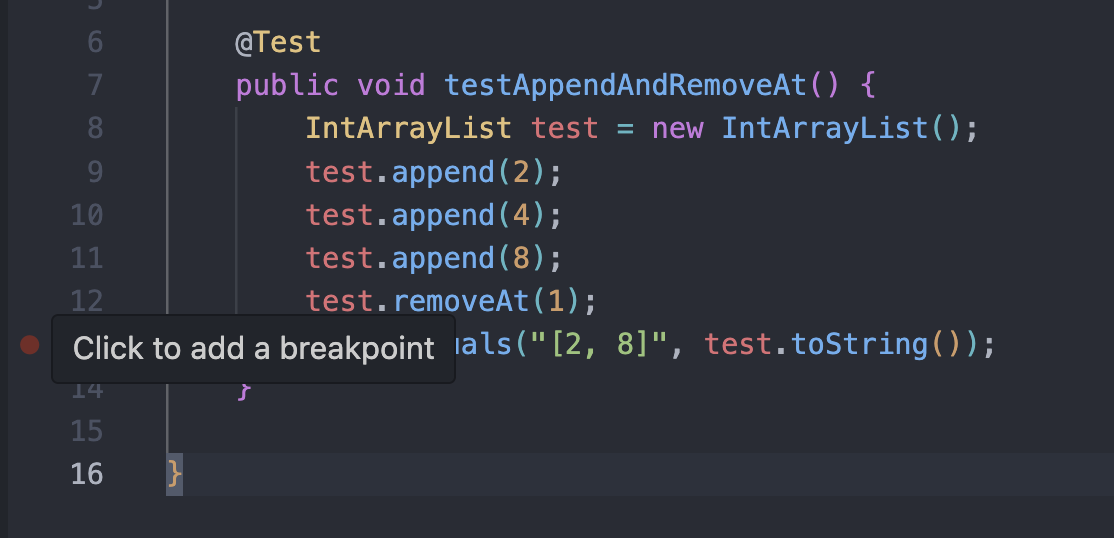
I’m going to add two more breakpoints by the for loop declaration and the return statement in our toString - we’ll see why in a moment.
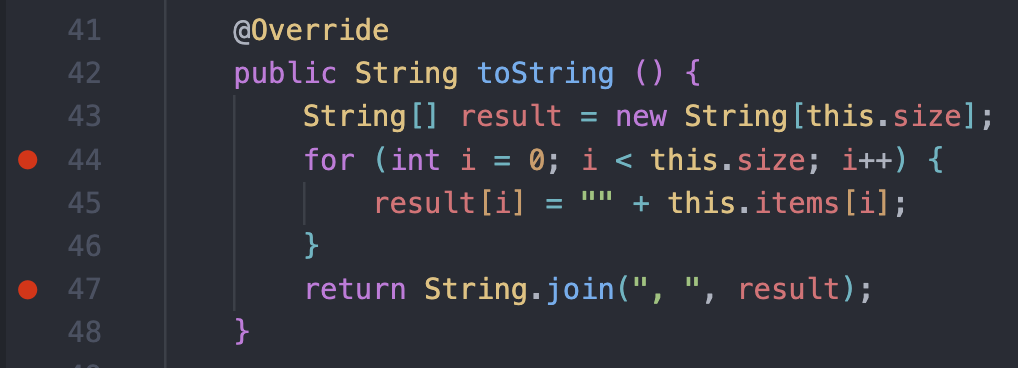
(2) Inspection panels allow you to see the state of the stack, local variables, and state of your objects from within methods.
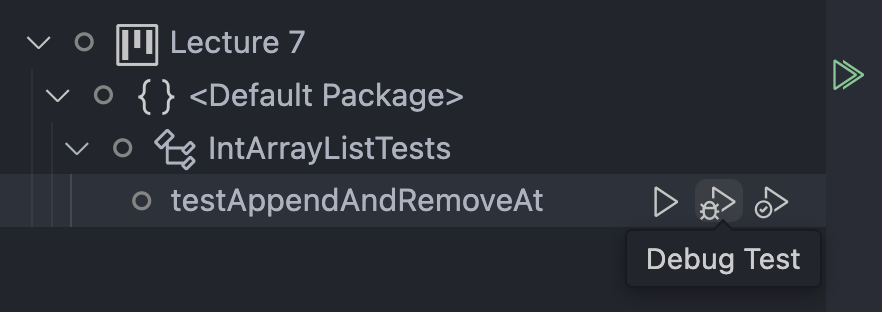
Once you have set breakpoints in parts of interest for your code, you can find the “Start Debugger” mechanism to open your inspection panels, and run your code (stopping at breakpoints).
In VSCode with Java, we can do this in the Testing tab! Instead of hitting the play button we’ve been using to run tests, we can just hit the button next to it with a little bug icon, and it’ll launch the debugger!
(3) Step tools allow you to move your code incrementally forward to carefully inspect the changes of variables.
At the top of your screen, you’ll see a little toolbar appear, and then you’ll notice we got a yellow line by one of our breakpoints.
What’s happening here is our code started executing, and then stopped just before running the line we set our breakpoint on.
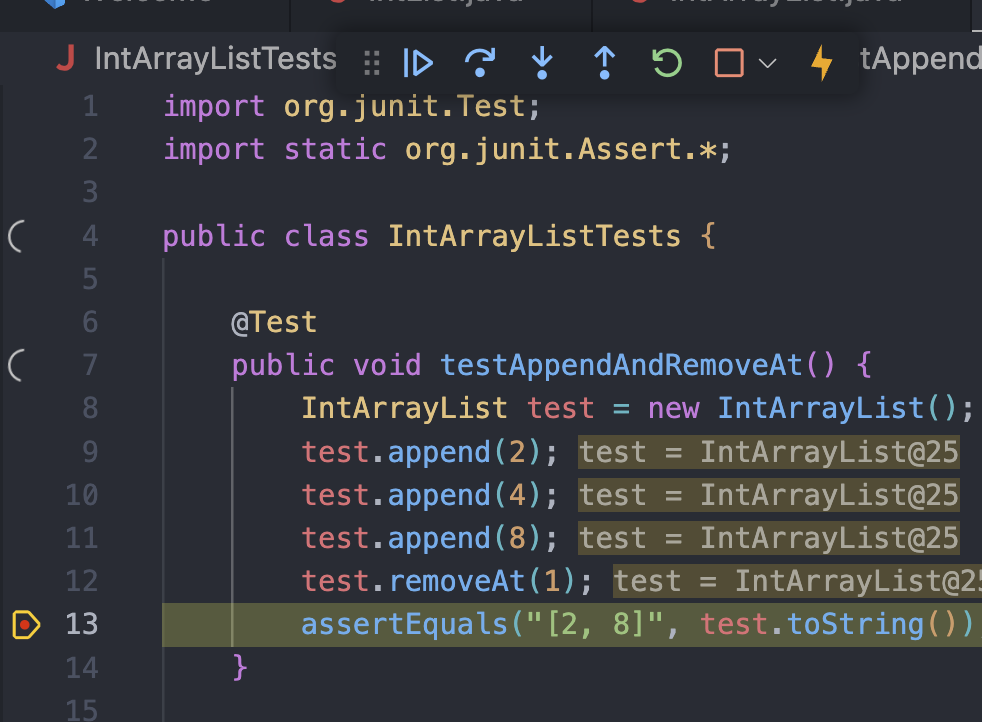
If we press the Play button (Continue), it’ll continue execution until our next breakpoint.
Now it’s jumped to that for loop we put a breakpoint at - now on the left tab of your screen there should be a heading that says “Variables”:
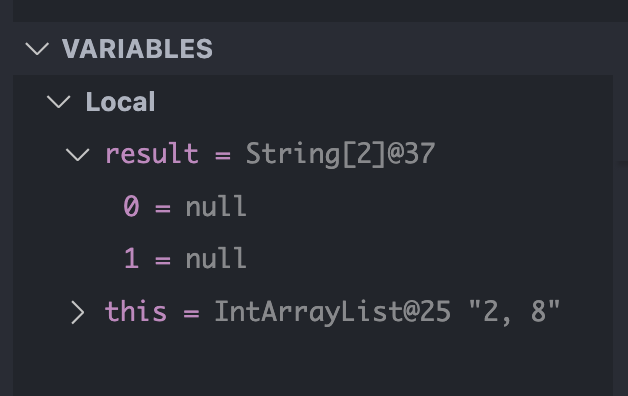
This is why we use the debugger. This panel shows us the exact state of every variable in our program at this specific moment of execution.
When I press the Continue button again, it jumps to the return statement:
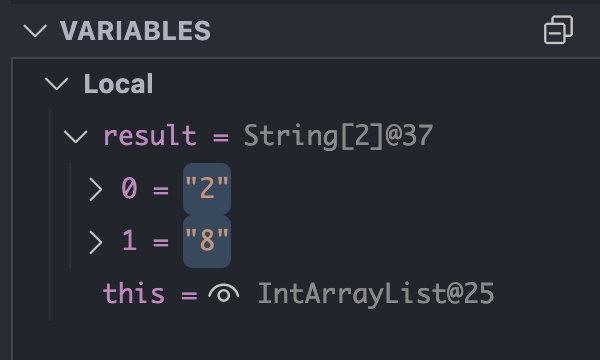
And look at that! I can see that the result array populated with the strings I wanted to add to it!
Set a breakpoint in the loop of the toString method and then step through them to observe how the debugger works!