Today, we start our investigation into the nitty-gritty of data structures.
Why don’t we start from the very foundation? A high-level overview of how a computer works and interacts with memory:
Architecture
The vast majority of computers in the modern era operate under a typical format:
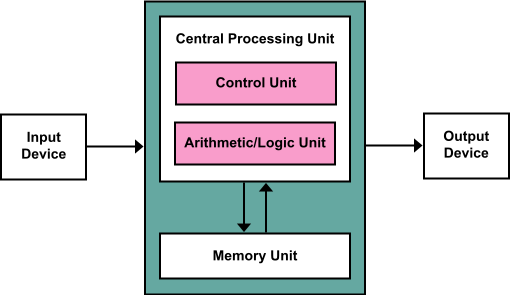
(Image courtesy of Wikipedia because I couldn’t be bothered to recreate a few boxes in Word or something)
Definition
This format is known as the Von Neumann architecture, which describes the basic format of computer hardware and how they interact.
The Von Neumann architecture has three main components:
Definition
(1) The CPU is commonly known as the “brains” of the computer, and is responsible for fetching, decoding, and then executing machine instructions.
The CPU consists of several sub-components, like the Arithmetic Logic Unit (ALU), which is responsible for processing common mathematical operations.
The Control Unit (CU) is responsible for directing instructions into this fetch-decode-execute cycle, and manages the CPU’s interactions with memory and I/O devices.
Definition
(2) The computer’s Main Memory (i.e. RAM) constitutes the computer’s short-term memory, and is used for storing temporary information for quick access.
We’ll talk a lot about main memory shortly!
Definition
(3) Input / Output (I/O) devices are… well… everything else! Input devices include keyboards and mice, output devices include monitors.
As our computer is operating, the processor is almost constantly fetching instructions to execute as given by our programs and operating system.
Intermediary computational data are stored in the main memory (RAM), which we’ll now examine more closely (if you’re interested in the CPU, then don’t worry — you’ll have plenty of opportunities to learn about it in your upper-division courses!).
Main Memory
Definition
Main memory is used to hold running machine code and any data used by the program (e.g., call stack, variables, objects, you name it).
Let’s look a bit at how memory is organized so that we can analyze it through the programmatic lens.
Definition
Digital information is stored, at its smallest constituent level, in bits: magnetic low and high, as represented by 0 and 1, respectively.
Definition
Bits are strung together to store more information. There are 8 bits in one byte.
Main memory consists of large “banks” of bytes organized to be able to store and retrieve information quickly.
These banks consist of contiguous blocks of bytes organized in a sequential addressing system.
Different computers will have different byte-groupings depending on its hardware.
Definition
A word is an architecture-dependent number of bytes that represents the maximum number of bits that it can process at one time.
Definition
The word-size is the number of bytes in one word per system.
For example, a 32-bit system has 4 bytes in 1 word; i.e., the 32-bit architecture can process 32 bits at once.
The word size is limited by the hardware and operating system of a computer.
Definition
Main memory is then indexed by memory address, which are numerical orderings of the words in the RAM.
Typically, addresses are 1 byte apart, with a maximum address decided by the computer architecture.
For example, if our addresses start at 0x000...0 (i.e., 0), then 0x000...4 (i.e., 4) would be the address 4 bytes away.
We can summarize the above pictorially:
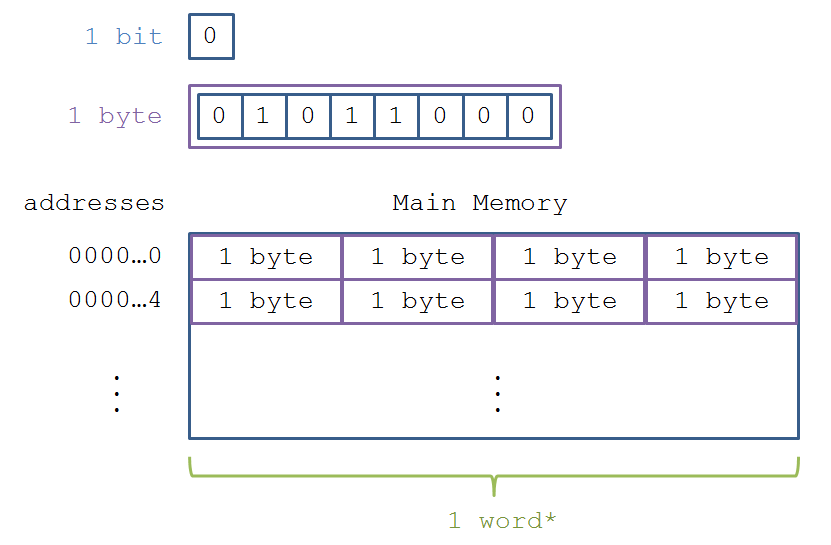
- Recall that word-size is architecture dependent. The above depicts a 32-bit architecture.
Now that we know how the memory is organized, let’s see why we care!
Memory Management
So why do we care what memory looks like? Or for that matter… at all?
We have several premises that lead to a clear conclusion:
- Every computer has a finite amount of memory.
- Our running programs are stored in memory, along with their states (variables, etc.).
- Many programs may be running at once on a computer.
Definition
Therefore, the finite amount of memory must be used efficiently for each running program to make sure there’s enough for everyone. This is called memory management.
Luckily for you, Java is a very high-level language, which means that most of the memory management is handled by the compiler.
However, since we’ll be making our own data structures from first principles, we have to understand how memory management works; we’ll need this knowledge to analyze some of the challenges and benefits attached to different data structures.
Allocation Basics
Remark
Disclaimer: you’ll have a whole class to examine memory management more closely later; much of the descriptions herein will be hand-wavy for sake of time.
So how does Java interact with memory? For this discussion, we’ll focus on how variables are stored.
Definition
Variables of any type reserve an appropriate amount of memory in which to store their data. Memory reserved for one variable cannot be used for another until that memory has been freed.
This is true of primitives, whose sizes are always known (e.g., ints take up 32 bits), as well as objects, whose size can vary.
This means that every time memory is reserved for a variable, it then “lives” at some address in RAM, e.g.:
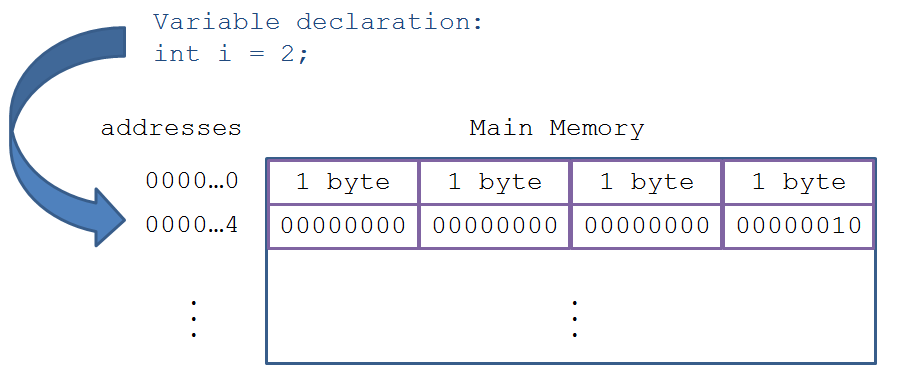
The specific address allocated to is decided by your operating system.
Question
Why doesn’t the programmer decide the specific address to allocate memory?
Answer
It would be a total mess and completely unscalable for multiple applications running at once. Not to mention, having to keep track of every address would be a nightmare!
Garbage Collection
Since memory is finite, we want to make sure that our programs are only reserving what they need. Since we often need variables for only portions of time before they are not used again, we would like a way to free memory that is no longer being used.
Definition
Garbage collection is the process by which memory reserved for “garbage” (i.e., variables and objects that are never going to be used again in our code) is freed. Memory that is freed can then be used again.
Java has an excellent garbage collector that saves the programmer from having to remember when to free garbage memory, unlike other languages like C / C++ wherein the programmer is in charge of taking out the trash!
To understand the Java garbage collector, we need to understand a bit about the lifespan of variables.
Question
What is a local variable?
Answer
Local variables exist only in their defined scope. When a program’s control flow leaves that scope (e.g., returning from a function) the memory allocated for those local variables is freed.
Example
Will the following code compile? If not, why?
public static void f () {
    int whoops = 6;
}

public static void main (String[] args) {
    int i = 5;
    f();
    System.out.println(whoops);
}
Above, we see that the println statement has an error: the variable whoops is out of scope in the main method (it lived only in f), and so was freed after
returning from the function.
Definition
Garbage collection for local variables is quite simple: allocate the memory when declared, keep it as long as it is in scope, then deallocate when it is out of scope.
Definition
For this reason, local variables are allocated in a special area of memory called the stack (since we push and pop scopes from the stack as well as each scope’s associated local variables).
Definition
The Call Stack determines what values of which variables are stored in which Stack Frames, containing all of the local variables belonging to a particular function call.
Toolkit
Any time a function is called, a Stack Frame for it and its local variables are placed atop the call stack, which persists until it returns to the Stack Frame below it.
Example
Draw the Call Stack behavior (including local variables) for the function calls in
Calls.javabelow.
public static int g (int p) {
    return p + 2;
}

public static int f (int p) {
    p = g(p);
    return p * 2;
}

public static void main (String[] args) {
    int p = 2;
    p = f(p);
    System.out.println(p);
}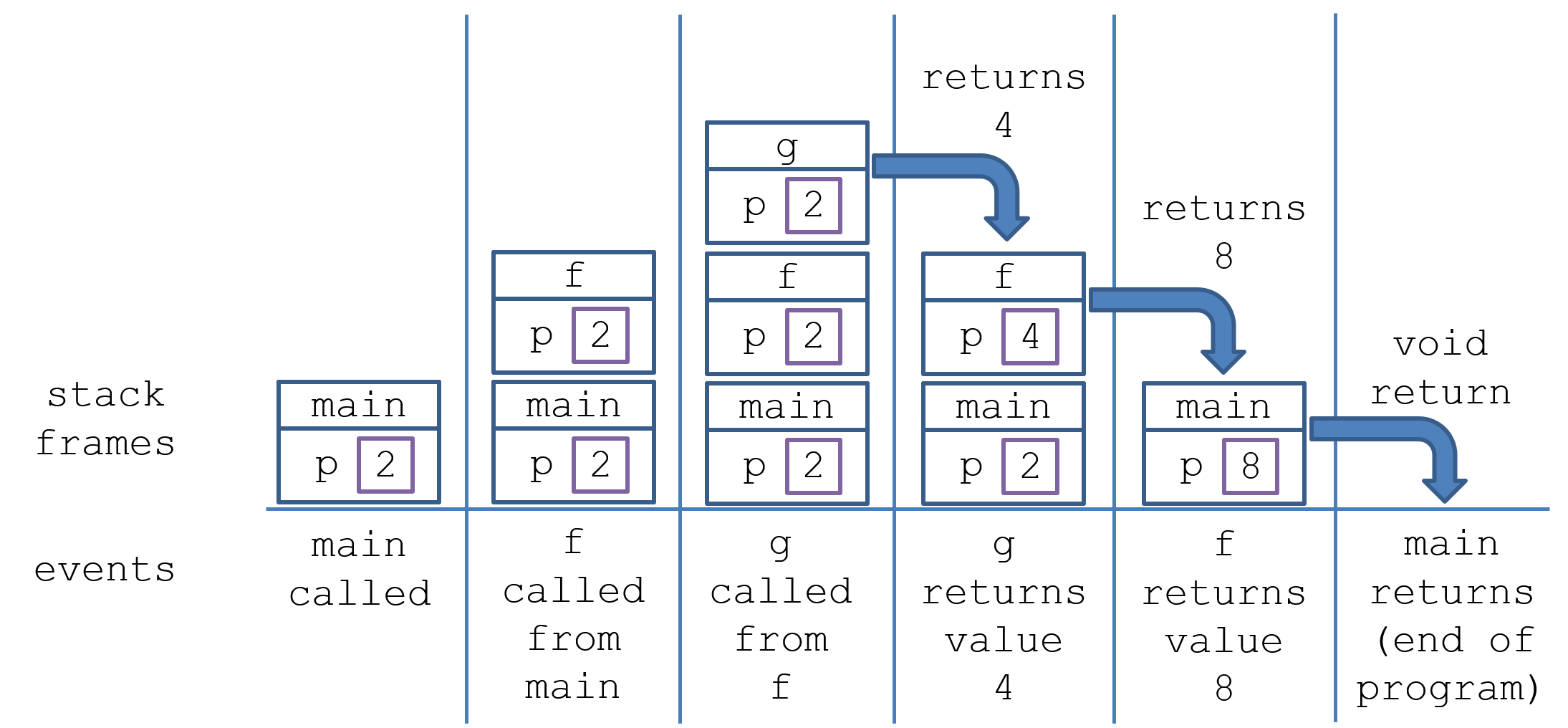
Notes on the above:
- Although each parameter of
f, ghave the same namep, they each reserve their own memory for it in their respective stack frames. - Each time a method is called, it generates a new stack frame atop the one that called it; this is how we know where to return control flow after a method returns.
- When a method returns, whatever local variables were allocated to it in its stack frame (which includes parameters) are also freed.
Local variables are great for storing small amounts of information like counters and flags, but what about large objects?
The problem is that large memory allocation can be computationally expensive, and so we want to do so as little as possible with little repeated allocation.
This provides the impetus for heap allocation and references:
Definition
In Java, non-primitives have memory reserved in a special area of memory called the heap.
Definition
Every object in the heap must be accessed by a reference, which is simply a stored memory address that points to an object’s location in the heap.
Toolkit
Any time we use the
newkeyword in Java, we are allocating memory for that object in the heap, and storing a reference to it in the variable we assigned to it in the declaration.
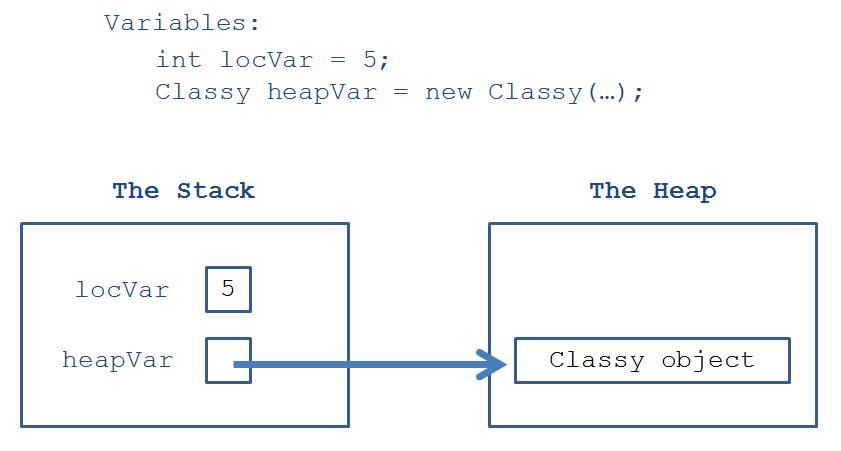
Whew! That’s a lot to soak in, let’s look at a pictorial representation.
Question
When would it make sense for the garbage collector to free the memory for an object in the heap?
Answer
As soon as all references to it have been deallocated.
Things to note about the above:
- The locVar local int is stored directly in the stack. It will remain there until it is popped from the stack (i.e., falls permanently out of scope).
- The Classy object (i.e., any non-primitive) is stored in the heap, but its reference is stored in the stack and is called heapVar.
- The Classy object will remain in the heap until no references point to it. The local reference heapVar will stay in the stack until it is popped (i.e., falls permanently out of scope).
Reference Mechanics
Dealing with references in Java can get a bit overwhelming if we’re not careful with how we diagram what’s happening behind the scenes.
Toolkit
The default value of a reference is
nullunless otherwise assigned, a special value in Java that indicates a reference that points to nothing.
Toolkit
Object references can be set and compared to null, e.g.,
Forneymon f = null;andif (f == null) { ... }.
Debug
IF however, we try to access a field or method of a reference that points to null, we’ll get a
NullPointerException, e.g.:
Burnymon b = null;
// [X] Syntax error because b is null:
b.getName();
Reference Assignment
Toolkit
References can be copied just by using the assignment operator (=), which also happens when references are passed as arguments to functions (the parameters are assigned the same reference as the argument).
This has the effect of simply storing the memory location of the object in the heap within multiple local reference variables; pictorially, we have:
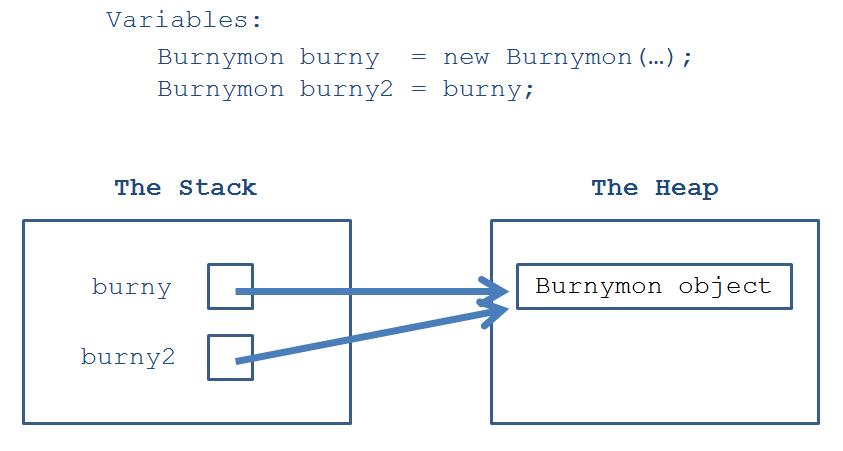
Things to note about the above:
- burny and burny2 are both references that point to the same Burnymon object in memory. This means that if I call
burny.takeDamage(...);, that damage taken will be manifest if I were to callburny2.getHealth(); - Importantly, assigning one reference to another does not make a copy of that object
- The Burnymon object in the heap will only be deallocated when BOTH burny and burny2 references are deallocated.
- Note: when we draw the above, and we see that
burnyandburny2point to the same object in the heap, then we know thatburny == burny2 => true! This is how we can think about the identity equivalence check described in the last lecture, which can be answered visually: if two references point to the same object in memory, they would be identity equivalent.
Heap allocation with references is useful for a variety of reasons:
- We can decide the lifetime of an object, rather than have it necessarily be deallocated when popped from the stack.
- This allows us to also pass the same object between methods so that its state can be modified by them needing to only reference the parameter.
How does this look in terms of passing references to methods?
Passing References vs. Primitives
Debug
Java’s “pass by value” behavior means that arguments are copied into parameters when a method is called. This can lead to confusion when it comes to calling methods with primitives vs. reference-types / objects!
Toolkit
Remember that object arguments have their references copied into parameters, but primitives have their values copied.
Sometimes this can get really difficult to track, so I recommend the following sage piece of advice…
Remark
When in doubt, draw it out!
Example
What will the following snippet print out?
public class RefEx {

    public int field;

    RefEx (int i) {
        this.field = i;
    }

    public void transferAndReplace (RefEx other, int j) {
        this.field += other.field;
        other.field = j;
        j = 0; // [?] Does this do anything?
    }

    public static void main (String[] args) {
        int j = 5;
        RefEx a = new RefEx(1);
        RefEx b = new RefEx(2);
        a.transferAndReplace(b, j);

        // [?] What gets printed below?
        System.out.println(a.field);
        System.out.println(b.field);
        System.out.println(j);
    }

}