It’s time to revisit a favorite operation of ours: membership search.
Question
What is the definition of membership search operations? What are their purposes?
Answer
Membership search operations are those that provide a means of querying some collection to see if an item of interest is contained within.
Question
In what data structures have we seen the membership search operation applied, and what computational guarantees did they provide?
Answer
- Lists: required a linear search from the start to scan the entirety of contained items until we found the one we were looking for, or had exhausted all possible locations it could be: O(n)
- Binary Search Trees: allowed us to perform binary search on a balanced binary search tree, recursively ruling out 1/2 of the possible locations the item could live in the collection with each comparison: O(log(n))
Remark
Now for the tantalizing question… can we do better, and if so, what is the cost that we pay?
Andrew’s World Famous Supermarket Analogy
This part of the lecture must begin, by tradition, with Andrew’s Famous Supermarket Analogy.
Not only will this give us some intuition for what follows, but also provides a roadmap for what we can endeavor to implement in what has sometimes been heralded as the data structure to end all data structures!
Story time! Let’s consider that we’re in a supermarket looking for our favorite breakfast food: hash browns.
Now, we haven’t been to this particular supermarket before, so the layout may not be intuitive, and in particular, we may not know where to find that crunchy, delicious treat.
Question
Suppose we wander aimlessly down each row in sequence looking for hash browns until we find them. What is the computational complexity of this operation in terms of n, the number of products in the supermarket?
Answer
O(n), since we’re essentially just doing a linear search!
This is generally the approach I like to take, since I’ll usually find other snacks along the way that I want to add to my cart.
Question
However, if we’re in a hurry, is there an easier way to find the exact location of the hash browns?
Answer
Yes! Just swallow our pride and ask a store employee and they’ll tell you right away.
Question
What is the computational complexity of this alternative approach, again in terms of n, the number of products in the supermarket?
Answer
O(1), since we’re given the exact location of the query and need not search any longer!
Wow! Constant time lookup, that’s impressive!
Question
If you are a store employee who knows the locations of every product and what is meant to go in each section, with what complexity can you add new items to the shelves?
Answer
O(1) again, since we know the exact location in which to place every item!
AND constant time insertion?! Can we get supermarket employees to manage our data structures for us?!
More on that in a moment…
Maps & Dictionaries
Remark
Before considering the implementation, we should note that the Supermarket example has presented us with a new data type since we have Products that correspond to their store Location.
These are generally referred to as maps / dictionaries:
Question
Before looking at a single definition, when you hear the words “Map” and “Dictionary,” what do these objects share in common outside of the programmatic context?
Answer
They are means of looking things up quickly, and finding some corresponding value attached to a query.
First, let’s think about some real-world examples:
| Collection | Key | Value |
|---|---|---|
| Webster’s Dictionary | Words | Definitions |
| Degree Works | Student ID | Transcripts |
Definition
Maps / Dictionaries are ADTs that represent collections of elements consisting of some value that corresponds (i.e., maps) to a unique key.
Toolkit
Generally, keys are simple, unique identifiers used to quickly map to more complex values.
You’ve probably already used these data types in JavaScript objects or Python dict()s, but today we’ll take a look under the hood at some
implementation details.
Question
Funny enough, the idea of a Map with its unique keys is really just a more general data type of one we’ve already seen; what is it?
Answer
A Set! The only difference between a Map and a Set are that Maps have unique keys that map to some value; with a Set, the Keys and Values are essentially the same thing (and must be unique)!
So, with that intuition in mind, let’s think about how to implement a Map, inspired by our Supermarket analogy.
Hash Tables
Definition
A hash table is a data structure useful for implementing the Map and Set ADTs by using an array of buckets to store its values where each bucket index corresponds to a functional mapping from each value’s unique key.
Toolkit
Because some keys are not numeric (and therefore lack a direct translation to an index), we define
hashCodesthat produce a semi-unique index pertaining to each object’s fields / properties / characteristics.
Definition
A hash function,
fprovides the index of a value’s bucket corresponding to its key such thatf(key(val)) = index.
Definition
Just how the buckets are arranged or arrange the data they contain depends on what’s called the hashing scehma.
Definition
In a separate chaining schema, buckets are other data structures that hold the table’s values (e.g., LinkedLists), while in an open addressing schema, the buckets hold the values themselves.
We’ll look at the differences between these two schemas shortly… in the meantime, let’s make sure the analogy is completely concrete…
Question
Complete the following analogies based on our supermarket example with employees being “oracles” that can be consulted to find items in aisles of the market.
- Supermarket = ?
- Aisle = ?
- Product = ?
- Employee = ?
Answer
Supermarket = Hash Table; Aisle = Bucket; Product = Key/Value; Employee = Hash Function.
See how masterful that example was?
We’ll look more at hash functions later, for now, let’s consider some simple examples to make the above more concrete.
Operations
Let’s talk about the basic operations of a hash table:
Definition
Insertion in a hash table follows a basic recipe:
Step 1: acquire the index of the bucket corresponding to the added value’s
keyusing the key’s hash function.Step 2: determine if the key has already been stored at the bucket at the index found in Step 1.
Step 3: if the key is new, insert* the key-value pair at that bucket; if it’s not, simply update the value corresponding to that key.
- Just how this search is done depends on if we have a separate chaining vs. open addressing hash table, to be discussed shortly.
Example
Suppose we wish to store Products that have a unique
name(the key) and map to somepricevalues. Let’s draw the HashTable with the following properties:
- Keys/Values: Keys are product names (Strings), values will be the product prices (doubles).
- Buckets [separate-chaining]: buckets are an array of LinkedLists, and begin with a cacity of 8 buckets (Let (b = 8)).
- Hash Function: For Product name
x(a String), we have:f(x) = x.length() % b(Note: we need to mod by (b), the number of buckets, so that we will always have a valid index from among those in our buckets).
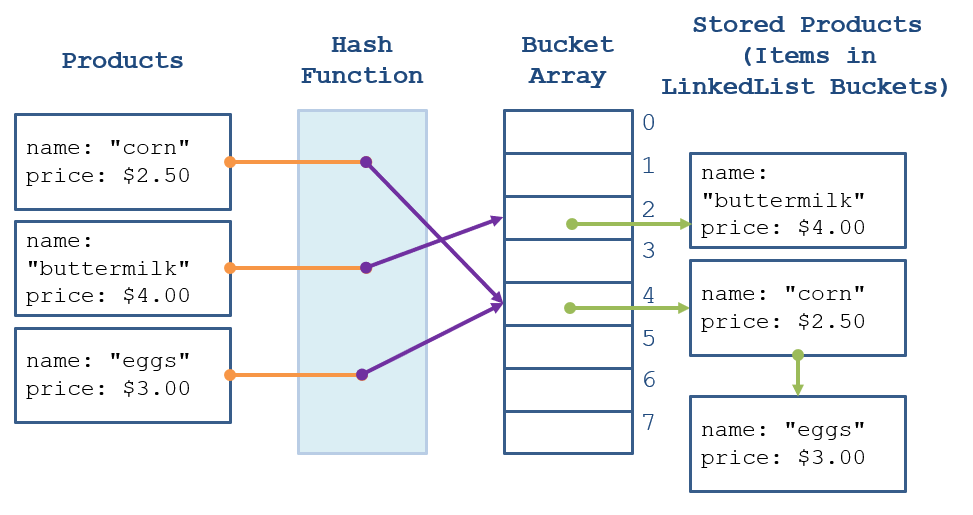
Some notes on the above:
- Note how both “corn” and “eggs” have the same number of characters, and so hash to the same bucket (4) — this is known as a collision and is generally something we want to avoid when possible, but deal with as it will inevitably come up.
- In this Separate Chaining Hashing Schema, the buckets are LinkedLists that store the individual items. As such, when any collision happens, we simply append the new item to the existing List at that bucket.
- Note how “buttermilk” contained more characters than there were buckets, so we took its hashed value and modded by the number of buckets to wrap around back to the 2 index.
Definition
Membership Search / Value Retrieval follow the same steps 1 + 2 as insertion, except instead of inserting / updating a value in Step 3, we return the value associated with the key if it exists.
Example
Try querying the map in the example above for the keys
"apple","pear", and"corn".
Entries
Let’s think a bit about the implementation of the picture we’ve drawn above, starting with the objects containing our key and value.
Just like LinkedLists / Trees had Nodes in order to store and organize their data, so too do HashTables!
Definition
An Entry object is a basic node storing both key and value with the following behaviors:
Toolkit
The
equalsbehavior must be overridden to compare equivalence of keys.
Question
Why is this necessary if keys are unique?
Answer
Because collisions can still happen, so in the event that we’re performing membership search, we might have to perform a linear scan on the bucket to make sure the query key does or doesn’t exist.
Toolkit
The
hashCodebehavior must be overridden to produce a semi-unique index corresponding to the key’s hashCode.
Finally, we see that hashCode method I’d promised to explain many moons ago!
You might remember an additional property I reminded us all of:
Question
Because Entries employ the
equalsandhashCodemethods of their stored keys (potentially any data type), why did we say that any time we overrodeequalsthat we also overrodehashCodefrom the Object class’ implementation?
Answer
Think about what happens if you had a HashTable with Entry
keyswhere only one of the two was overridden:
- ONLY Overriding equals: two keys that should be considered equivalent may hash to separate buckets.
- ONLY Overriding hashCode: two keys that should be considered equivalent may hash to the same bucket, but then multiple values could correspond to the same key.
This is a bit harder to interpret with simple String keys, but is necessary for more sophisticated data types used as keys.
Toolkit
Note: if an Entry’s key and value are the same thing, this is how we can use a HashTable to also implement a Set!
Performance Analysis
Now that we’ve seen a couple of examples, let’s consider the performance cases for Hash Tables:
Question
What is the best case of Hash Table insertion / lookup? What are the scenarios that would lead to this behavior?
Answer
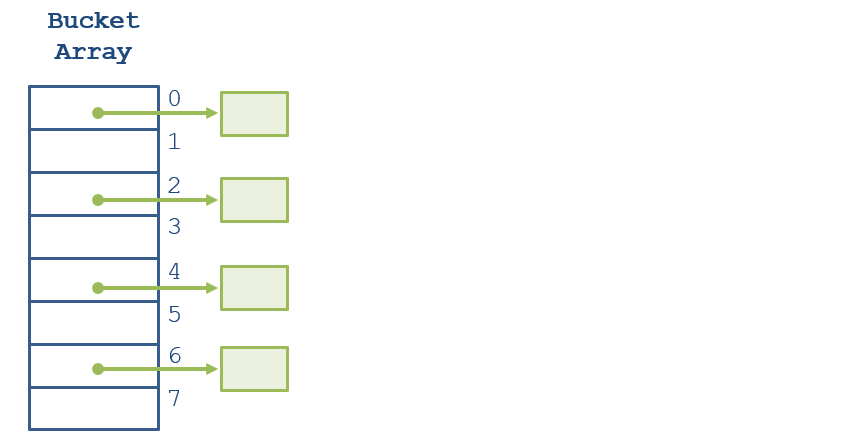
O(1) when there are no / few collisions, implying that buckets do not grow large (hash function leads you straight to the location!)
Example
Sketch a picture of what this best case would look like!
Question
What is the worst case of Hash Table insertion / lookup? What are the scenarios that would lead to this behavior?
Answer
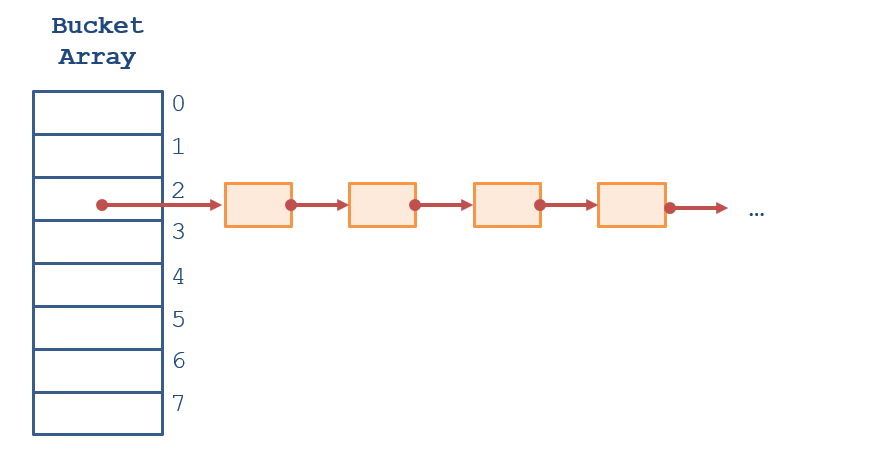
O(n) when there are many collisions, implying that almost everything is stored in the same few buckets, leading to linear lookup to see if a key has already been stored inside!
Example
Sketch a picture of what this worst case would look like!
Remark
It seems, then, that a lot of how these best and worst cases are characterized relies on the chosen Hash Function — let’s take a look at how to design these next!
Hash Functions
Now that we’ve seen hash tables in their basic format, let’s talk about how hash functions work.
Recall that hash functions return an integer index corresponding to some characteristics of a given type.
Hash Function Basics
Example
Suppose we are designing the String class’
hashCodemethod. What are some ways you might construct such a function?
Let’s consider a simple hash function that simply returns the number of letters in the given string to an int; it might look something like this.
@Override
public int hashCode () {
    return this.length();
}
Question
As simple as it is, what’s wrong with the hash function we designed above?
Answer
Suppose we were storing a bunch of String keys all with 2 letters — they would all map to the same bucket, and then just be stored in a list!
This would be like having 1 row in our whole supermarket and then whenever we ask where something is, the employee tells us “row 1 bro.” Useless!
As such, one of the chief traits we want to try to equip our hashCodes with is uniformity: the idea that different keys get very different values.
Toolkit
Desirable Trait 1 - Uniform Distribution: Collisions are undesirable, therefore, a good hash function should uniformly distribute hashed keys among buckets.
Avoid collisions you say! Alrighty, how about the following hash function:
@Override
public int hashCode () {
    return (this.length() * Math.random());
}
Question
What is wrong with the above hash function?
Answer
Involving a random number generator means that it will avoid a lot of collisions, but then we’ll never be able to find the same buckets in which we stored certain values!
Toolkit
Desirable Trait 2 - Consistency: A hash function for which
f(key) = ishould always hash the samekeyto the same indexi.
This makes sense, intuitively; if you asked our supermarket employee which row the cookies were in twice, you wouldn’t expect them to change their answer!
And lastly, although it might go without saying…
Toolkit
Desirable Trait 3 - Speed: A hash function should quickly and efficiently compute its hash value, because (almost) every operation a hash table performs always starts with the hash function.
Remark
Note: generally, since the number N of items stored in a hash table will be huge compared to the size of a single item, k, it’s fine if our hash function has some tolerable cost that is some function of k.
In other words, don’t make your hash function compute π to the billionth digit every time it’s called, and then use that result to avoid collisions.
Remark
Hashing any key will take some time, but that time is a function of the key (small), not the number of items in the collection (huge).
Example
Consider then: what would be a good way to combine all of the above properties for a
// ...for some String object's field:
// char[] chars; // holds individual characters in String
@Override
public int hashCode () {
    int code = 0;
    for (int i = 0; i < this.chars.length; i++) {
        code = 31 * code + this.chars[i];
    }
    return code;
}
Some notes on the above:
- The above exploits the uniqueness of a String based on the integer character codes of its composing chars.
- What’s with the multiplication by 31? Fans of Baskin Robbins? No, turns out that in cryptography and its accompanying statistics, multiplying a code by a prime number will increase its chances of being unique.
- Won’t the above eventually experience integer overflow? Yes! Turns out though that negative hashCodes are just fine — simply take the absolute value when you need to map them to a bucket index.
- Wouldn’t this needlessly compute the same code many times over? Yes, so in a better implementation, we would compute the hashCode once on demand, and then store its result in a field.
Remark
A wide swath of research has investigated the best hashing methods to avoid collisions, which are outside of the scope for this introduction, so we won’t detail more traits herein.
Example
Still, you can try out Java’s hashCodes for any object — see what you get for the following!
System.out.println("a".hashCode());
System.out.println("b".hashCode());
System.out.println("hash brown".hashCode());
System.out.println("hash brown".hashCode());
Hidden on the original page
The section below was commented out of the Fall 2021 course notes, so students never saw it. It is preserved here because the material is complete and usable.
Hashing Schemas
Definition
Hashing schemas decide how values will be stored in the hash table’s buckets.
Toolkit
In a separate chaining scheme, buckets are data structures (usually linked lists or BSTs) that hold the hash table’s values.
Toolkit
In an open addressing scheme, the buckets hold the values themselves.
The main difference: how each deals with collisions.
Separate Chaining
Definition
Separate chaining tables deal with collisions by simply inserting colliding items into the DS at each bucket.
In the case of linked lists, we can simply prepend items; in the case of BSTs, we follow the traditional BST insertion algorithm.
Example
We already saw examples of separate chaining with linked list buckets in the above section, but here one is again for comparison.
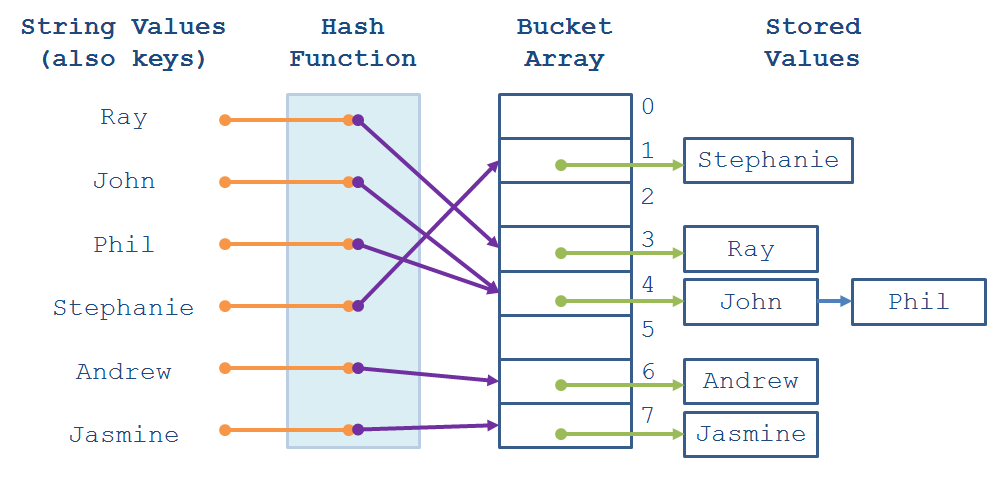
Open Addressing
Definition
Open addressing tables deal with collisions by hashing a value to its corresponding bucket, and then searching linearly down the buckets for the first opening.
The idea is that, with a sufficiently large hash table and decent hash function, we can avoid the space overhead of additional data structures that separate chaining has.
Example
Let’s look at the same values as the above example, but with an open addressing schema instead.
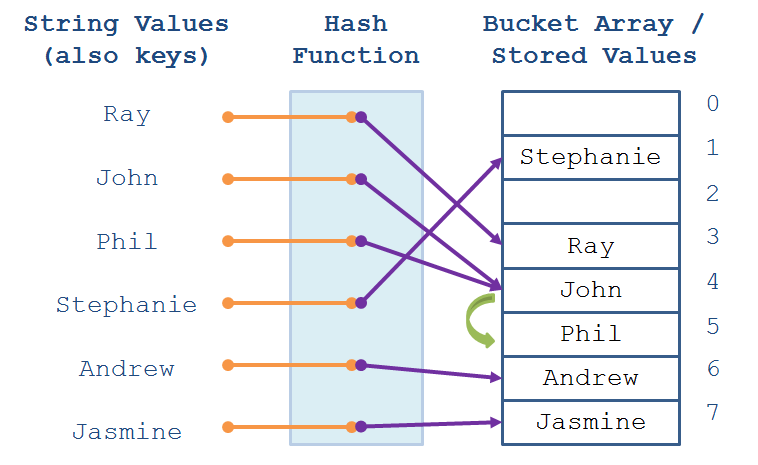
Bottom line: separate chaining is generally the preferred method when space isn’t a concern, but more memory-conscious applications might employ an open addressing schema instead.
Analyzing Hash Tables
Before we conclude our discussion on hash tables, we have two analytic points to cover:
Ensuring Constant Time Insertion / Lookup
One question you might ask: if our hash table is aiming for O(1) insertion and lookup, how can we guarantee this performance if we have a lot of collisions?
Question
We’ve already seen that designing a good hash function is necessary to reduce collisions… but even the best hash function won’t be particularly useful if we lack what else?
Answer
Enough buckets to store the values within!
As such, reducing collisions is really a 2-part process:
- Design good hash functions that we gain some theoretical guarantees of evenly distributing the values.
- Maintain a healthy load factor.
Definition
A hash table’s load factor (L) is the ratio of items (n) to buckets (b), expressed as:
L = n / b
Toolkit
Empirically, a good load factor is kept below 0.75, which (if maintained and a good hash function is designed) leads to the following picture:
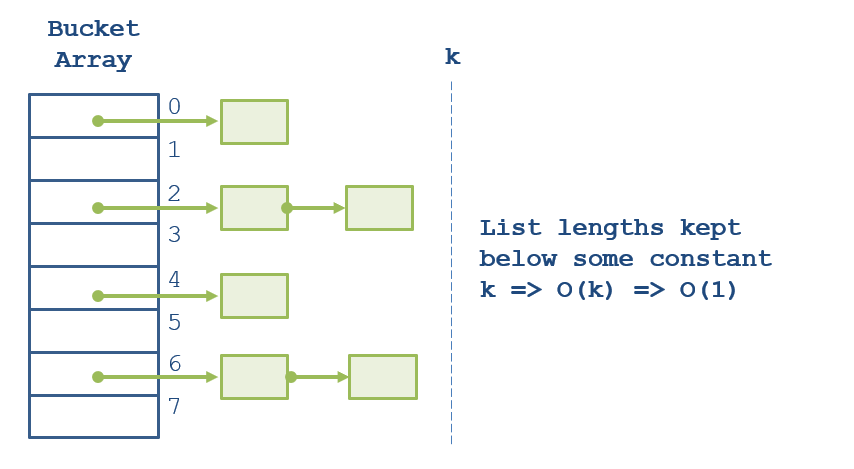
Generally speaking, a low load factor may not indicate a good hash table; for instance, we might have 100 items stored in 1 of 200 buckets, but the load factor will still be below 0.7.
Indeed, the best hash functions maintain buckets with fewer than 3 elements.
However, assuming a good hash function, a high load factor generally means that we’re taxing the high performance guarantees of our hash table (there are too few buckets to accommodate so many values).
Question
How can we ensure a healthy load factor when it starts to grow past some threshhold like 0.7?
Answer
Just grow the number of buckets and then rehash your elements into the larger bucket array! This of course incurs some overhead, but little more than growing an ArrayList once it is at capacity.
Question
Assuming a well-formed hash function, how does the “fix” suggested above keep insertion / lookup at constant time?
Answer
Again, assuming a well-formed hash function that distributes keys evenly, a load factor kept below 0.7 (growing the bucket size to accommodate more entries) implies that every bucket is kept beneath some constant size. As such, asymptotically, search on a list of constant size is, by definition, an O(1) operation.
Hash Table Use Cases
So what are the pros and cons of hash tables?
Toolkit
[Pros] With the guarantees above, HashTables boast the fastest O(1) insertion + lookup behavior for Sets and Maps!
Toolkit
[Cons] Memory intenseive to maintain a good load factor, and we lose any guarantee of sorted ordering that a BinarySearchTree implementation could maintain.
Implementation
Just to see all of the moving pieces in action, let’s consider a small example from our SuperMarker analogy!
Example
Create a small mock HashTable implementation of a Map in which
StringproductNames [keys] are mapped to their associateddoubleprices.
Here’s a simple implementation we’ll work on together in class!
package pricescan;

import java.util.*;

public class ProductPriceHash {

    // Constants
    // ----------------------------------------------------------------------------
    private static final int START_SIZE = 8;

    // Fields
    // ----------------------------------------------------------------------------
    private LinkedList<Entry>[] buckets;
    private int size;

    // Constructor
    // ----------------------------------------------------------------------------

    /**
     * Creates a new ProductPriceHash with the given START_SIZE number of buckets
     */
    public ProductPriceHash () {
        this.buckets = new LinkedList[START_SIZE];
        this.size = 0;
        for (int i = 0; i < buckets.length; i++) {
            this.buckets[i] = new LinkedList<Entry>();
        }
    }

    // Public Methods
    // ----------------------------------------------------------------------------

    /**
     * Returns the number of unique key-value pairs stored in this ProductPriceHash
     * @return The number of unique key-values pairs stored within
     */
    public int size () {
        return this.size;
    }

    /**
     * Associates the given productName with its corresponding price
     * @param productName [Key] Name of the product to price
     * @param productPrice [Value] Price of the product
     */
    public void put (String productName, double productPrice) {
        LinkedList<Entry> targetBucket = this.buckets[this.getBucketIndex(productName)];
        Entry newEntry = new Entry(productName, productPrice);
        boolean duplicate = targetBucket.remove(newEntry);
        targetBucket.add(newEntry);
        if (!duplicate) {
            this.size++;
        }
    }

    /**
     * Returns the price associated with the given productName, or throws
     * an IllegalArgumentException if the key does not exist
     * @param productName [Key] Name of the product for which to query the table
     * @throws IllegalArgumentException
     * @return
     */
    public double getPrice (String productName) {
        LinkedList<Entry> targetBucket = this.buckets[this.getBucketIndex(productName)];
        ListIterator<Entry> it = targetBucket.listIterator();
        while (it.hasNext()) {
            Entry current = it.next();
            if (current.name.equals(productName)) {
                return current.price;
            }
        }

        throw new IllegalArgumentException("Key does not exist in this table!");
    }

    // Private Helper Methods
    // ----------------------------------------------------------------------------

    /**
     * Returns the index corresponding to the given productName in the Table
     * @param productName productName to search for in the Table
     * @return The index in the range of [0, # of buckets - 1]
     */
    private int getBucketIndex (String productName) {
        int rawHash = productName.hashCode();
        return Math.abs(rawHash) % this.buckets.length;
    }

    // Private Inner Class
    // ----------------------------------------------------------------------------

    // [!] Note: in some implementations, this is a public inner class and can be
    // accessed / interacted-with by the user (Java's makes this public)
    private class Entry {

        String name;
        double price;

        Entry (String n, double p) {
            this.name = n;
            this.price = p;
        }

        @Override
        public boolean equals (Object other) {
            if (this.getClass() != other.getClass()) {
                return false;
            }
            Entry otherEntry = (Entry) other;
            return this.name.equals(otherEntry.name);
        }

        @Override
        public int hashCode () {
            return this.name.hashCode();
        }

    }

    // Small Test
    // ----------------------------------------------------------------------------

    public static void main (String[] args) {
        ProductPriceHash pr = new ProductPriceHash();
        pr.put("Apples", 3.50);
        pr.put("Pears", 2.50);
        pr.put("Dragonfruit", 10.00);
        System.out.println(pr.size()); // 3
        pr.put("Pears", 4.50); // Note: duplicate key overwrites previous!
        System.out.println(pr.size()); // Still 3!
        System.out.println(pr.getPrice("Apples")); // 3.50
        System.out.println(pr.getPrice("Pears"));  // 4.50

        // Try querying for a key not stored within...
        try {
            System.out.println(pr.getPrice("Guava"));
        } catch (Exception e) {
            System.out.println(e);
        }
    }

}
Nifty! That gives us a pretty good picture for everything going on inside of a HashTable, but let’s just get some sanity tests here…
Remark
Suppose, erroneously, we replaced our hash function with one that only returned a single bucket at index 0 — let’s clone our implementation above and then replace its
getBucketIndexmethod with the following:
// ...
private int getBucketIndex (String productName) {
    return 0;
}
// ...
Let’s see what the damage is from doing the above with a little test:
package pricescan;

import static org.junit.Assert.*;
import org.junit.Test;

public class ProductPriceHashComparison {

    static final int TEST_SIZE = 40000;

    @Test
    public void goodHashTest() {
        ProductPriceHash pr = new ProductPriceHash();
        for (int i = 0; i < TEST_SIZE; i++) {
            pr.put("" + i, i);
        }
        for (int i = 0; i < TEST_SIZE; i++) {
            pr.getPrice("" + i);
        }
    }

    @Test
    public void badHashTest() {
        BadProductPriceHash pr = new BadProductPriceHash();
        for (int i = 0; i < TEST_SIZE; i++) {
            pr.put("" + i, i);
        }
        for (int i = 0; i < TEST_SIZE; i++) {
            pr.getPrice("" + i);
        }
    }

}
Notice how much more poorly the bad hash function performs compared to the good one… but yet…
Question
Our original ProductPriceHash is still underperforming a bit… what did we forget to do?
Answer
We forgot to grow the number of buckets as our Load Factor got too large!
Example
Left as a very highly suggested exercise: implement a
checkAndGrowmethod to dynamically grow our bucket list (lol) as the Load Factor becomes larger than 0.75!
JCF Maps + Sets
Toolkit
Java offers its own HashMap class, whose documentation you can find in the following link: [Open Addressing] HashMap
Toolkit
Like most JCF classes, HashMaps are generics that must be constructed with given types for its keys and values, as specified using the generic syntax:
<Key, Value>.
Example
Here’s a simple example, as listed on the above documentation:
// Hashtable storing String keys with Integer values
// HashMap<KeyType, ValType>
HashMap<String, Integer> numbers = new HashMap<String, Integer>();

// Store several values mapped to corresponding keys
// numbers.put(key, value);
numbers.put("one", 1);
numbers.put("two", 2);
numbers.put("three", 3);

// Retrieve them too!
System.out.println(numbers.get("two")); // prints: 2
Toolkit
There’s also HashSets, as we discussed implementing above!
HashSet<String> seti = new HashSet<>();
seti.add("bump");
seti.add("set");
seti.add("spike");
System.out.println(seti.contains("set"));   // true
System.out.println(seti.contains("pass"));  // false
BSTs vs. HashTables
Toolkit
Note that there are both
TreeSetandTreeMapcollections for Binary Search Tree implementations of Sets and Maps, respectively!
Example
Consider our membership test example from the BST lectures wherein now, we pit our HashSets against TreeSets. These are some pretty good data structures for membership tests, so let’s up the ante a bit… and insert… 10-million items!
public class SetTests {

    private static int TEST_SIZE = 10000000;

    @Test
    public void testHashSetMembership () {
        HashSet<Integer> hashy = new HashSet<>();
        for (int i = 0; i < TEST_SIZE; i++) {
            // [!] Adding i to HashTable
            hashy.add(i);
        }
        for (int i = 0; i < TEST_SIZE; i++) {
            // [!] Membership tests
            hashy.contains(i);
        }
    }

    @Test
    public void testTreeSetMembership() {
        TreeSet<Integer> ts = new TreeSet<>();
        for (int i = 0; i < TEST_SIZE; i++) {
            // [!] Adding i to BinarySearchTree
            ts.add(i);
        }
        for (int i = 0; i < TEST_SIZE; i++) {
            // [!] Membership tests
            ts.contains(i);
        }
    }

}
Question
If HashTables provide such quick lookup, what benefits are there to using BinarySearchTree Sets and Maps?
Answer
Primarily: we can get items in a BST in a sorted order just by performing an inorder traversal in O(n)… not so for HashTables!
Example
Observe the order in which items are printed out by iterating over the contents of a Hash vs. TreeSet (you might have to run it a few times to see that HashSets do not iterate over items in sorted order like TreeSets always will).
private static int TEST_SIZE = 20;

public static void main (String[] args) {
    HashSet<Integer> hashy = new HashSet<>();
    TreeSet<Integer> treey = new TreeSet<>();
    for (int i = 0; i < TEST_SIZE; i++) {
        int item = (int) (TEST_SIZE * Math.random());
        hashy.add(item);
        treey.add(item);
    }

    System.out.println("============ PRINTING HASH SET CONTENTS ============");
    for (int item : hashy) {
        System.out.println(item);
    }
    System.out.println("============ PRINTING TREE SET CONTENTS ============");
    for (int item : treey) {
        System.out.println(item);
    }
}