Lecture 10: Enlisted Again: The Linkening! (Part II)
Implementing Linked Lists
In this implementation tutorial, we’ll cover the basics of a singly linked list with a defined Iterator.
Before that, let’s remind ourselves of the basic operations we defined in the IntList Interface (errr, bad sentence, I guess that’s like saying an ATM Machine or PIN Number…):
public interface IntList { public void append (int toAdd); public int getAt (int index); public void insertAt (int toAdd, int index); public void removeAt (int index);}
Recall: Interfaces specify the what we want defined, and Data Structures provide the concrete implementations or how they are.
Just as we implemented this interface with the IntArrayList class
To do so, we’ll be creating 3 classes:
The IntLinkedList class itself
The Node inner class to hold the data of the linked list
The IntLinkedList.Iterator inner class to define Iterators on our linked lists to be used by users of our class for safely accessing elements.
Designing Nodes
Let’s start by designing our Nodes, which is quite simple: as we said, in a singly linked list, they contain only the data and a reference to the next Node in the chain.
So, that gives us:
private class Node { // Since this class is private and inner, no need // to access restrict its fields; they're safe! int data; Node next; Node (int d) { this.data = d; this.next = null; }}
Designing the IntLinkedList
With our Nodes in place, we can now turn our attention to designing the IntLinkedList itself.
Recall: implementing an interface means we need at minimum implement the methods listed, but that doesn't also mean we can't provide additional methods in our implementation.
As such, for this tutorial, we’ll implement 3 methods in addition to those promised by the IntList:
public int size (); returns the number of elements currently in the IntLinkedList.
public int prepend (int toAdd); adds the given int toAdd to the the head of the IntLinkedList.
public Iterator getIterator (); returns an Iterator starting at the host LinkedList’s head.
Let’s start out easy by defining our fields, constructor, and then the size, append, getAt methods.
public class IntLinkedList implements IntList { private Node head; private int size; IntLinkedList () { // Not strictly necessary for either fields since // these are the default values for each this.head = null; this.size = 0; } public int size () { return this.size; } public void append(int toAdd) { Node toAppend = new Node(toAdd); this.size++; // Case 1: Node being added is only node if (this.head == null) { this.head = toAppend; return; } // Case 2: Need to find end before adding Node current = head; while (current.next != null) { current = current.next; } current.next = toAppend; } public int getAt(int index) { if (index >= size || index < 0) { throw new IllegalArgumentException("index out of legal range"); } // Find index requested by advancing a // reference named current Node current = this.head; while (index > 0) { current = current.next; index--; } return current.data; } // Inner classes elided ...}
Reflecting on our implementations of append, getAt above, identify some inefficiencies and suggest improvements.
append has to start at the head and find the end of the list each time! Instead, we could maintain a tail reference to always be able to instantly add a node.
getAt must traverse the list from the head each time to find its index; if used many times, we should instead define and employ an Iterator to go through the list (to be defined shortly).
Just to verify our work with some empirical tests…
public class IntLinkedListTests { public static void main (String[] args) { IntLinkedList llCoolJ = new IntLinkedList(); llCoolJ.append(1); llCoolJ.append(2); llCoolJ.append(3); System.out.println(llCoolJ.getAt(0)); // 1 System.out.println(llCoolJ.getAt(1)); // 2 System.out.println(llCoolJ.getAt(2)); // 3 }}
Simple enough! Now let’s try looking at a removeAt method, enabling us to remove items from our LinkedList:
This requires us to keep track of two references as we walk down our list, but the walking happens very similarly to how we do getAt:
current: a node that will begin at the list’s head, and advance to the node we’re trying to remove
prev: a node that will begin at null, and then advance to the head right when current advances from it, tracking one node behind it.
Once we reach the node we’re trying to remove, we check to see if that node is the head, in which case we remove the head, otherwise we reorient prev’s next reference to point to the node after current!
public class IntLinkedList implements IntList { ... public void removeAt(int index) { if (index >= this.size || index < 0) { throw new IllegalArgumentException("index out of legal range"); } // We track two references: // - current: the node we want to remove // - prev: the node right before it (null if removing the head) Node current = this.head; Node prev = null; // Walk forward to the target index while (index > 0 && current != null) { prev = current; current = current.next; index--; } // Case 1: Removing the head node // prev is null, so we just advance head past the removed node if (current == this.head) { this.head = current.next; } // Case 2: Removing a node in the middle or at the end // We "unlink" current by pointing prev's next past it if (prev != null) { prev.next = current.next; } this.size--; } ...}
Simple enough! Now let’s tackle a prepend method, which isn’t strictly required by the interface, but which we’ll add anyways.
Recall: one operation that was computationally difficult for ArrayLists was prepending an item; let's see how Linked Lists actually excel with this.
The trick here is careful record-keeping. We have to remember that prepending to a linked list can occur in a couple of cases:
When it’s empty, and
When there is at least one item already added.
If we’re clever, we can structure our prepend method to handle both of these cases elegantly:
public class IntLinkedList implements IntList { ... public void prepend (int toAdd) { Node toPrepend = new Node(toAdd); toPrepend.next = this.head; this.head = toPrepend; this.size++; } ...}
Super easy and elegant! How about you try one on your own…
Example
Add a method to IntLinkedList called public void insertAt (int toAdd, int index); that inserts a new Node holding toAdd at the given index, shifting the Node that was there (and everything after it) one position later. Inserting at index == size should append.
Having trouble coming up with the structure? Click here for a portion of the solution, with a few key steps missing.
...public void insertAt (int toAdd, int index) { // index == size is allowed: that means appending if (index > this.size || index < 0) { throw new IllegalArgumentException("index out of legal range"); } // Inserting at the front changes the head -- we already know how! if (index == 0) { ???; return; } // Find the Node just BEFORE the spot we're inserting into Node prev = this.head; for (int i = 0; i < index - 1; i++) { prev = ???; } // [!] Order matters: the new Node grabs the rest of the list FIRST, // then prev lets go of it and points to the new Node Node toInsert = new Node(toAdd); toInsert.next = ???; prev.next = ???; this.size++;}...
Debug
Swap the last two reference updates and see what happens: once prev.next points to the new Node, nothing points to the rest of the list anymore, so it’s lost!
We can also test it briefly:
public class IntLinkedListTests { public static void main (String[] args) { IntLinkedList llCoolJ = new IntLinkedList(); llCoolJ.prepend(3); llCoolJ.prepend(1); llCoolJ.insertAt(2, 1); // middle: [1, 2, 3] llCoolJ.insertAt(4, 3); // end: [1, 2, 3, 4] System.out.println(llCoolJ.getAt(1)); // 2 System.out.println(llCoolJ.getAt(3)); // 4 }}
Lastly, we want to design our Iterator inner class before we provide a way to create Iterators from the IntLinkedList.
Designing the IntLinkedList.Iterator
The Iterator class we're about to design will be useful for... well... iterating through our linked list elements efficiently, and can even be used to manipulate the list.
We’ll use a single field: a reference to a Node that can be changed to point to the “current” Node in the list during iteration.
We’ll also implement 3 methods for the Iterator to be able to navigate the linked list:
public boolean hasNext (); returns true if the iterator is currently on a Node (i.e., there is still a value to read)
public void next (); advances the iterator to reference the next Node in the chain
public int getCurrentInt (); returns the int contained in the currently referenced Node.
So, that gives us the following:
public class IntLinkedList implements IntList { ... /** * Defines a new Iterator on the current LinkedList */ public class Iterator { private Node current; // [!] Note: we'll make this a private constructor because we want users // to get Iterators through our IntLinkedList's getIterator method private Iterator (IntLinkedList host) { this.current = host.head; } public boolean hasNext () { return this.current != null; } public void next () { if (this.current == null) { return; } this.current = this.current.next; } public int getCurrentInt () { if (this.current == null) { throw new IllegalStateException("No current element"); } return this.current.data; } } ...}
Now, the only thing left is to provide a means by which our IntLinkedList users can actually create an Iterator.
Note: the Iterator’s constructor is defined on a current IntLinkedList object, and so we can
create a method in the IntLinkedList class to return a new Iterator starting at the head position:
public class IntLinkedList implements IntList { ... public Iterator getIterator () { return new Iterator(this); } ...}
In brief, our getIterator returns a new Iterator object starting at the head of the Linked List of which it’s a part — it will have access to the head because it’s an inner class!
Although, as usual, we should thoroughly test our new class(es), let’s just get a quick gist for how we might use the above.
public class IntLinkedListTests { public static void main (String[] args) { llCoolJ = new IntLinkedList(); llCoolJ.prepend(3); llCoolJ.prepend(2); llCoolJ.prepend(1); IntLinkedList.Iterator it = llCoolJ.getIterator(); System.out.println(it.getCurrentInt()); // 1 it.next(); // Advance the iterator one node System.out.println(it.getCurrentInt()); // 2 it.next(); // Advance the iterator one node System.out.println(it.getCurrentInt()); // 3 }}
Example
GREAT Exercise: Revise the IntLinkedList class to have a tail pointer as well as a head.
Note: the above implementation is workable, but there are a NUMBER of improvements we can make to it; you'll perform one such optimization for your next homework by making it doubly-linked and circular!
(Mostly) Complete IntLinkedList Code
public class IntLinkedList implements IntList { private int size; private Node head; IntLinkedList() { this.head = null; this.size = 0; } public int size() { return this.size; } public void append(int toAdd) { Node toAppend = new Node(toAdd); this.size++; // Case 1: List is empty! This will be our only node if (this.head == null) { this.head = toAppend; return; } // Case 2: Need to find the last node to append Node current = head; while (current.next != null) { current = current.next; } current.next = toAppend; } public void prepend (int toAdd) { // The head will be either: // - null (empty list) // - a Node (nonempty list) Node toPrepend = new Node(toAdd); toPrepend.next = this.head; this.head = toPrepend; this.size++; } public int getAt (int index) { if (index < 0 || index >= this.size) { throw new IllegalArgumentException("Requested index out of range"); } Node current = this.head; while (index > 0) { current = current.next; index--; } return current.data; } public void removeAt (int index) { if (index >= this.size || index < 0) { throw new IllegalArgumentException("index out of legal range"); } Node current = this.head; Node prev = null; while (current != null && index > 0) { prev = current; current = current.next; index--; } // We know that current -> node to remove // and prev -> node before current // Current may be head if (current == this.head) { this.head = current.next; } // Or not! if (prev != null) { prev.next = current.next; } this.size--; } public void insertAt (int toAdd, int index) { // index == size is allowed: that means appending if (index > this.size || index < 0) { throw new IllegalArgumentException("index out of legal range"); } // Inserting at the front changes the head if (index == 0) { prepend(toAdd); return; } // Find the Node just before the insertion spot Node prev = this.head; for (int i = 0; i < index - 1; i++) { prev = prev.next; } // New Node grabs the rest of the list first, then prev points to it Node toInsert = new Node(toAdd); toInsert.next = prev.next; prev.next = toInsert; this.size++; } public Iterator getIterator () { return new Iterator(this); } /* The Inner/Nested Class * Classes can classes within them! * We can create objects of them to be used * throughout our program! */ private class Node { int data; Node next; Node (int d) { this.data = d; this.next = null; } } public class Iterator { private Node current; private Iterator (IntLinkedList host) { this.current = host.head; } public void next() { if (this.current == null) { return; } this.current = this.current.next; } public int getCurrentInt() { return this.current.data; } public boolean hasNext() { return this.current != null; } }}
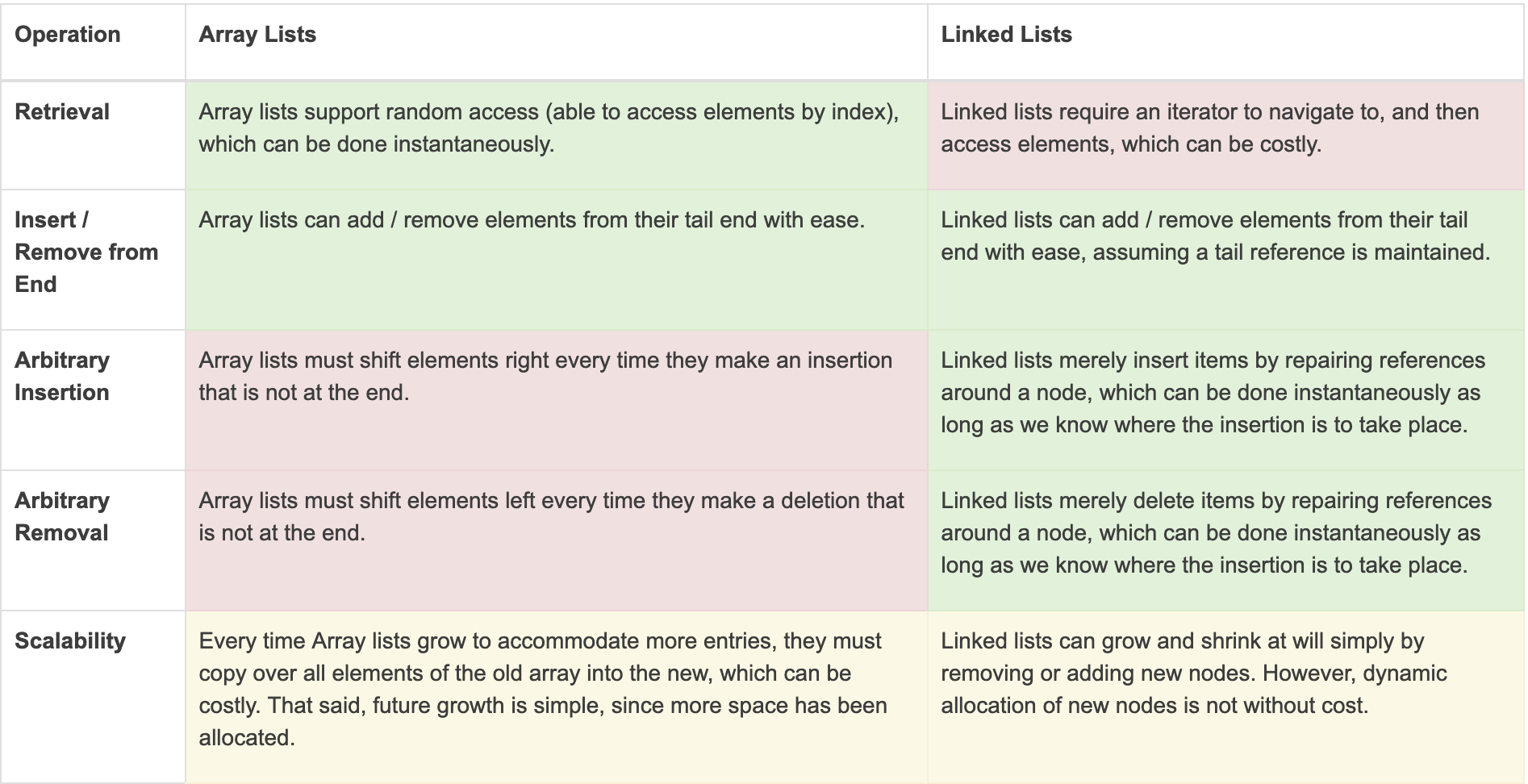
Linked Lists vs. Array Lists
A reasonable question you might be asking is: so why do we care about the different implementations of the List ADT? It seems that, ostensibly, the two do the same thing in slightly different ways.
Although we will formalize this distinction in the near future, the key motivations for choosing one over the other depend on your intended operations for the data structure:
tl;dr:
Use Linked Lists when you’re inserting or removing a lot not at the end of the list, or when you have absolutely no idea how many elements you plan to store in the collection.
Use Array Lists when you need fast access to arbitrary elements, or when you have a good idea for how many elements you plan to store in the collection.
A Note on Interfaces
Thus far, we’ve seen two separate Data Structures (IntArrayList vs. IntLinkedList) implementing the same Interface (IntList).
There are actually some additional properties of Interfaces that we should explore for object instantiation.
Classes implementing an interface can instantiate objects using references of the type of the interface, rather than the class.
Effectively, this limits the public interface of the objects to only those methods defined in the interface, even if the implementing class defines additional methods.
public static void main (String[] args) { IntList inty = new IntLinkedList(); inty.append(5); // OK because append is in the IntList inty.prepend(1); // NOT OK because prepend is not in the interface}
Although a somewhat baffling idea now, we’ll see in the coming week why it can be useful to restrict users to a particular interface over a more expansive one.
Parameters can be specified as the implementing interface type, soas to accept any implementing class.
public static int sum (IntList listy) { // ...}public static void main (String[] args) { IntLinkedList llCoolJ = new IntLinkedList(); IntArrayList arry = new IntArrayList(); // ... add some items to each here ... System.out.println(sum(llCoolJ)); System.out.println(sum(arry));}
Java Collections Framework
This might be a bit of a shocker to everyone, but you know all those data structures we’ve been implementing ourselves?
Well… turned out they’re pretty nifty… so nifty in fact, that there’s a class for almost every ADT in the Java Collections Framework.
The Java Collections Framework is a library of concrete data structures that implement ADT interfaces.
On the above linked pages, you can find documentation for all of the public interface methods for each data structure, but first, let’s look at how to use them.
Step One: Import Class
You first have to import the collection you want to use; for this example, let’s make a new ArrayList of Strings:
import java.util.ArrayList;
Step Two: Create Instance
Because the Collections framework is designed to work for holding items of any arbitrary class, we use Java generics to specify the type of data we want our collection to hold.
The syntax for initializing a generic type <T> is:
Collection<T> dsName = new Collection<T>();// Alternately, can leave off the second generic declarationCollection<T> dsName = new Collection<>();
For example, to create a new ArrayList of Strings, we simply write String between the brackets:
ArrayList<String> arr = new ArrayList<String>();// Or:ArrayList<String> arr = new ArrayList<>();
Step Three: Use Instance
We now consult the ArrayList class’ documentation to see what methods we have available. Let’s add and remove some items now!
ArrayList<String> arr = new ArrayList<>();arr.add("a"); // Appendarr.add("b");arr.add("c");arr.remove(1); // Removes "b" at index 1System.out.println(arr.get(1)); // What gets printed?
Note that Generics are required to be reference types (since references all take up the same amount of memory but can point to objects that are arbitrarily large or small).
This means that to use Java collections with primitives like ints, we instead supply Java’s “wrapper” classes such as Integer, but can then use them just like they’re ints:
ArrayList<Integer> arr = new ArrayList<>();for (int i = 0; i < 100; i++) { arr.add(i);}
Make sure to consult the JavaDoc pages for more information on how to use each collection, as well as their available methods!
Efficiency Concerns
Note that none of this juxtaposition between Array and Linked lists would be worthwhile if there weren't also efficiency benefits / risks from one choice over the other!
We’ll examine this more formally later in the class, but for now, consider the following test…
Example
Suppose we decide to prepend (i.e., add to the front index) some TEST_SIZE number of ints to both an ArrayList and a LinkedList. Which do you think will take longer to complete, as timed by JUnit? What happens if we double TEST_SIZE? Quadruple?
import static org.junit.Assert.*;import java.util.*;import org.junit.Test;public class PrependTest { private static int TEST_SIZE = 200000; @Test public void testArrayListPrepend() { ArrayList<Integer> arr = new ArrayList<>(); for (int i = 0; i < TEST_SIZE; i++) { // [!] Adding i to index 0 = prepend operation arr.add(0, i); } } @Test public void testLinkedListPrepend() { LinkedList<Integer> arr = new LinkedList<>(); for (int i = 0; i < TEST_SIZE; i++) { // [!] Adding i to index 0 = prepend operation arr.add(0, i); } }}
Concerns with efficiency will be a major focus of this course… but that’s about all this particular lecture can handle!