Time to get down to the nitty-gritty! Let’s start as pretty much every programming language introduction does: thinking about variables and the types of data they can hold.
Variables vs. Constants
How about we start with a nice underhand-pitch?
Question
What is a variable in programming? What is their purpose?
Answer
A variable is just a name for some value that can change over time, used to preserve and clarify your program’s state.
Variables hold whatever values we assign to them, and then can be referenced wherever they’re in scope whenever they are needed!
Note that since variables hold values, these values have a particular type, which is where one of our earlier distinctions of Java vs. Python comes into play:
Question
Recall that Java is said to be a manifest typed language — what does this mean?
Answer
Programmers manually declare the type that a variable has, which means it can only hold values of that type.
Let’s start by looking at local variables, which exist only in the context of a method in which they’re declared.
Creating a new variable in Java can be performed in a couple of formats:
Toolkit
Variable declaration: tells the compiler that we want a new variable of the specified type by the syntax:
// Syntax:<modifiers> type varName;// Modifiers are optional; we'll see those later.// Here's an example integerint age;
Remark
Note: declared variables do not have a value and cannot be evaluated until they do.
So, for example, trying to System.out.println(age); above would yield a syntax error.
Toolkit
To initialize a variable, we can either use the assignment operator (=) during declaration, or after:
// With declaration:int age = 31; // ugh I know, over the hill// OR: Assignment after declarationint age;age = 31;
Remark
Stylistically, we prefer the “with declaration” initialization when possible, but syntactically the latter is fine.
Remember that modifier part of the syntax we mentioned above? Let’s look at one use, which is to define constants.
Toolkit
Constants are just like variables, but will never change values during the course of the program. Syntactically, they are declared with the final
modifier, and stylistically, are named in ALL CAPS.
// Make constants of things that should never change:final int SOCIAL_SECURITY = 555555555;// Constants cannot have their value changed:// [X] Syntax Error:SOCIAL_SECURITY = 111111111;
Some notes on the above:
Constants should remain just that — so attempts to change them are considered errors!
We’ll see an application of constants later that ends up being good programming style — just be comfortable with the syntax for now.
There are other modifiers on variable declarations that we’ll see later.
Now that we know the var dec syntax, let’s talk about types a bit more!
Primitive vs. Reference Types (Objects)
Just like in Python, we can both create our own types or make use of the language’s standard ones.
Before we do anything too custom, let’s talk about the basic building block types: primitives.
Definition
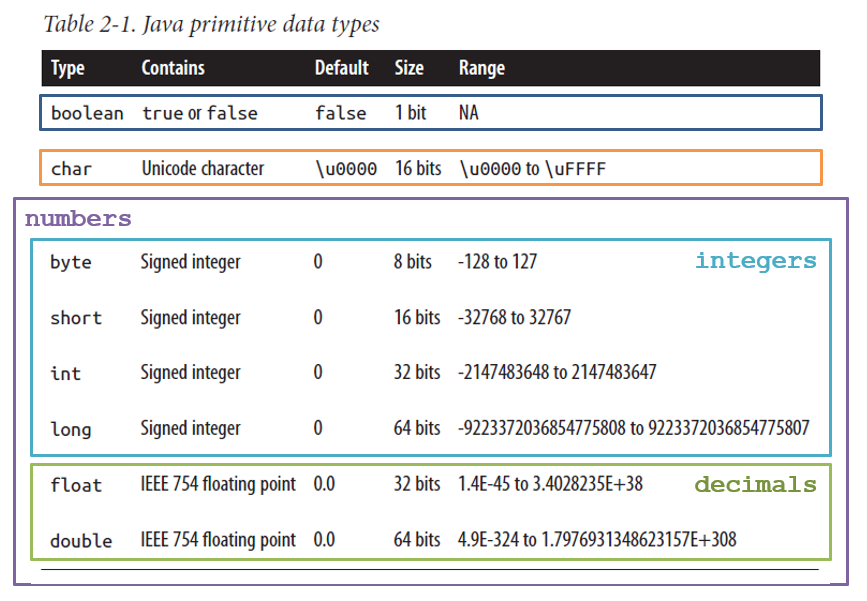
There are 8 primitive types in Java that are the basic values upon which more complex types can be built.
Here’s an overview from your textbook with a few of my annotations:
Toolkit
Note that there are really just 4 primitive “categories” (Booleans, characters, ints, and decimals), but several differently-sized variants in the numerical quantities.
Question
Why do you think certain numerical types have different sizes/capacities?
Answer
Primarily because memory is a finite computer resource, with every running program sharing it, and so it’s best to preserve that which we use only to that
which we need.
That said, for all of the purposes we’ll see in this class, using ints for integer values and doubles for decimals will suffice.
Example
Initialize variables of each primitive type with as cringey of pun names as possible.
Don’t mind if I do…
// Primitive types (8 total):boolean coolProf = false;char acter = 'A'; // [!] Note: single quotesbyte me = 2;short stuff = 1;int elligent = 5;long john = 922337203;float miBoat = 3.14159;double trouble = 5.555555555;// Reference Types / Objects (everything else)String bean = "yum";// Example of user-defined type (Card):Card kingOfClubs = new Card(KING, CLUBS);
Remark
In other words, primitives make up the “atoms” of the Java type world from which more complicated objects, or “molecules / compounds”, are formed.
(I got a B+ in chemistry so don’t trust that analogy too much)
Type Conversions & Casting
Here’s another pretty big distinction from Python: what happens with type mismatches?
Question
What’s a type mismatch?
Answer
When a value of one type is provided where another is expected.
Here’s an example:
int inty = 5;double dub = 4.4;// [X] Syntax error: type mismatchinty = dub;
Above, we’ve attempted to store a decimal value into an integer variable, which Java gets upset about.
Amusingly, the opposite direction is fine — storing an integer into a decimal value just tacks on a .0 and is groovy, but the above generates an error.
That said, when we want to stuff one value of one type into a variable of another, there are sometimes conversion methods available.
Toolkit
Type conversions / Casts provide a means of converting one type into another via the syntax:
(typeToCastTo) valueToCast
Different type conversion rules manifest differently, but the above is simple and can be fixed with the following:
int inty = 5;double dub = 4.4;// dub is converted to an intinty = (int) dub;// What gets printed here?System.out.println(inty);
Question
Now, I haven’t mentioned the rule for how doubles get converted to ints, but what do you think happens?
Answer
The decimal gets lopped off, and you’re left with whatever number is left of the decimal — an integer!
Sometimes, we can exploit these type conversions implicitly like in the following example:
int inty = 5;inty = 5 / 2;// What gets printed here?System.out.println(inty);
Toolkit
The above is known as integer division and can be used for a number of numerical applications.
Remark
Type conversion is not something you’ll need a lot, but you should consult Chapter 2 in your textbook for more info on type conversions.
So! That’s a good look at the essentials of variables and primitives, now let’s make a bunch of them!
Arrays
You might remember creating Lists of items in Python, which provide some ordered sequence of items in the collection:
Note that listy began as an empty list, and then grew to accommodate the stuff we added, which consisted of both numbers and strings.
In Java, we have similar mechanisms, but (as Java tends to be) can be a bit pickier.
Definition
Arrays are the basic Java mechanism for storing ordered sequences of some data type.
Remark
However, they are importantly different from Python Lists in that they are:
Fixed Size: meaning that they can only hold some predefined number of items once initialized (this will actually be the
first restriction we relax in our first data structure!).
Typed: meaning that, just like with Java variables, we must declare the types of items that are held within.
Array Declaration / Initialization
Toolkit
The syntax for initializing a new array with some given fixed size is:
<modifiers> type[] name = new type[size];
Example
To declare an array that has room for 3 ints, we would write:
int[] intArr = new int[3];
Some notes on the above:
The square-brackets [] by the type declaration indicate that the variable with the given name is a reference to an
array, and not simply an int.
All values in an array initialized like this start with their default value, which for numerical primitives, is 0.
Note the new keyword, which we’ll see show up a lot later in the course: it indicates that a new object (i.e., non-primitive) is being
created, with memory being reserved for it on the fly, and returns a reference to it.
If that last bullet has some words you don’t quite recognize yet, no worries — we’ll return to all of that in a bit.
Array Manipulation
Toolkit
Accessing / Setting array elements works the same as in Python: each element is indexed starting at 0, and then can be
accessed using the bracket notation: arrName[index]
// Java Array Access:int[] intArr = new int[3];System.out.println(intArr[1]); // Print what's in index 1intArr[1] = 5;System.out.println(intArr[1]); // See it change from the default
Debug
Warning: just like in Python, you’ll get an error for trying to access some index that is not in the legal range!
int[] intArr = new int[3];// [X] ILLEGAL Java Array Access:System.out.println(intArr[3]); // There's no index 3 silly!intArr[-1] = 5; // Nor are negative indexes allowed
Typically, to avoid the above, we can check how large an array is by consulting its length property:
Toolkit
All arrays have a length property that returns an int describing its size, which can be accessed via the syntax:
arr.length for some array named arr.
int[] intArr = new int[3];System.out.println(intArr.length); // 3
Misc-array-ny
In the meantime, remember how in Python you could just initialize a List with the elements you wanted? Java’s got a trick for that too, but it uses a
slightly different syntax:
# Python - list initialized with valuesint_list = [1, 2, 3]print(len(int_list)) # 3
// Java - list initialized with valuesint[] intArr = {1, 2, 3}; // Note: curly braces {}System.out.println(intArr.length); // 3
Question
Note how, in the above, we did not use the new keyword explicitly, nor declare the desired size of the array… but how
big do you think intArr is above?
Answer
It has precisely room for 3 ints, because that’s how many we initialized it with!
Now that we know about the primitives and arrays, let’s talk about one of the most ubiquitous non-primitive types: Strings!
Strings
Definition
Strings are non-primitive types that are just a sequence of chars… strung together to make text!
Toolkit
Strings are declared just like any other variable, except that they can be initialized by the special String literals, which are any text surrounded in double quotes "String literal":
String stringy = "initial text";
Remember earlier we said that primitives were like the “atoms” of the chemical world and “objects” were like the compounds?
Well, since we’re starting to think about how different data types are implemented in data structures (i.e., looking under the hood)…
Question
How do you think Strings are implemented from some combination of primitives?
Answer
They’re (internally) just an array of chars!
In fact, in other, lower-level languages like C, Strings are explicitly modeled as arrays of chars… but since dealing with text is so common, higher-level languages like Java
give us some shortcuts and convenience methods for dealing with text.
String Properties
That said, Strings in Java cannot be treated like arrays of characters, as they are objects that hide that implementation under the hood.
Instead, there are some properties of Strings we should talk about before we use them.
Toolkit
Java Strings are immutable, meaning their contained characters cannot be changed once they’ve been created.
String cantTouchThis = "abcd";// [X] ILLEGAL: Syntax errorcantTouchThis[1] = 'z';// OK: Can reassign a String variable to a new literalcantTouchThis = "touch";
Toolkit
Unlike Arrays, or Strings in Python, we cannot use the bracket access syntax [] to even access characters in a String, nor do they have a .length
property.
Other methods take arguments (inputs) like requesting a character at a particular index:
Toolkit
The .charAt(index) method returns the character at the given index (as long as it’s in-bounds).
String bean = "green";System.out.println(bean.charAt(2)); // e
We won’t look at all of the methods available to Strings because… well.. there’s a lot of them!
The good news is that there are a couple of very convenient ways to find out what methods are available for any type’s objects… especially if your memory is as shit as mine!
Toolkit
The real way to look up a class’ methods is to consult the Javadocs (documentation) for it, which are, for all of the standard Java libraries, available online.
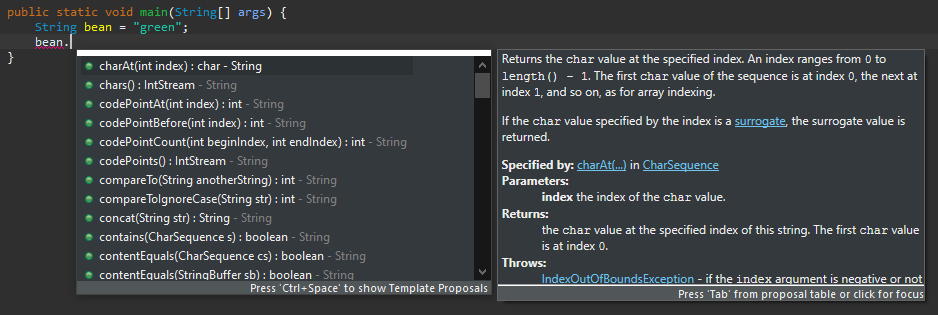
The lazy way to look up how to use a class’ methods is to use an IDE’s code suggestions.
For most standard Java IDEs, typing the method-call period after an object of a class will summon a convenient window with all of its available methods along with their documentation, like so:
Debug
There’s one EXTREMELY important difference in Strings between Python and Java: how you compare them for equivalence:
Toolkit
To determine whether or not two Strings are equivalent (i.e., have the same characters in the same order), use the .equals(otherStr) method, NOT the ==
operator.
String str = "same?";// [X] Undefined behavior: may not always be true!System.out.println(str == "same?"); // Sometimes not true// OK: Safe way to compare Strings for equivalenceSystem.out.println(str.equals("same?")); // Always true
Debug
We’ll cover why this is the case in a later lecture, just remember: == is safe to compare primitive values for equivalence, but not objects!
String Conversions
Sometimes we find ourselves wanting to convert Strings to other types similar to the casting we saw earlier.
Debug
To make things more complicated, however, it turns out we cannot use the same syntax to cast between primitive and non-primitive types.
String numberOrString = "2";// [X] Syntax error: cannot cast from String to intint num = (int) numberOrString;
Luckily, there are methods available in some other Java classes to plug this gap, since it’s such a common task:
Toolkit
The Integer.parseInt(strToConvert) and Double.parseDouble(strToConvert) methods can be used to convert Strings to numerical primitives, returning the
numerical equivalent of the String, if possible.
String numberOrString = "2";// String properly converted toint num = Integer.parseInt(numberOrString);// [?] What gets printed below?System.out.println(numberOrString + numberOrString);System.out.println(num + num);
Those are the essentials with Strings! After the next lecture, we’ll run through a classwork that synthesizes it all!