Unit Testing Guide
So testing your code with print statement’s has gotten tedious. Especially when those print statements look like…
System.out.println("Who designed this?");Yeah. I think we can do better.
Now, listen, I get it. I too like to write my code, test some basic inputs and outputs that I’m expecting, and call it a day. But if I whipped together a bridge, drove my Subaru across it to check for structural integrity, and called it a day, the Federal Highway Administration would have some strong words.
In programming, we take testing seriously: in user-facing applications, having core functionality go down is bad for business, and in security-sensitive applications, doing anything less than the most you can possibly do in terms of testing leaves the door wide open.
What happens when a hundred cars are driving across my bridge at once? A thousand? What about when I have a 50-ton truck driving across it? Or a dozen? How long can the bridge sustain whatever it’s maximum occupancy/weight is before structural failure? How does rain, or sleet, or snow, or high winds, or extreme high temperatures, or extreme low temperatures affect the bridge? What if the weight distribution on the bridge is uneven for extended periods of time? Do I need to worry about the integrity of this bridge for years? Decades? Centuries?
Okay, enough about bridges. In programming, the paradigm I’m referring to is something called Unit Testing.
Unit Testing Basics
Unit Testing, at it's core, is testing the smallest functional unit of code.
Generally speaking, you’re testing a particular method, and more specifically you’re usually testing one particular piece of that method’s functionality. One kind of input.
Let’s pause for a brief example. Let’s say I’m writing a class that tracks a particular user’s Bank Account. A brief version looks something like this:
public class BankAccount {

    private int balance;

    public BankAccount(int initialBalance) {
        balance = initialBalance;
    }

    public void deposit(int amount) {
        balance += amount;
    }

    public void withdraw(int amount) {
        balance -= amount;
    }

    public int getBalance() {
        return balance;
    }
}
A note: normally speaking, we would use doubles to represent account balances since money is almost always in decimal format, but it adds some complications to later testing
Okay, looks pretty sensible. Let’s do a quick print test to make sure it works!
public static void main(String[] args) {
    BankAccount account = new BankAccount(1000);

    System.out.println(account.getBalance());

    account.deposit(100);
    System.out.println(account.getBalance()); // should be 1100

    account.withdraw(200);
    System.out.println(account.getBalance()); // should be 900
}
Heyo! Looks like everything works. But is that enough?
account.withdraw(10000);
System.out.println(account.getBalance());
…oh. Okay, maybe we should get more granular. Time for Unit Tests!
JUnit
A bit of handwaiving, but a Java Unit Test (JUnit) file should start something like this:
import static org.junit.Assert.*;

import org.junit.Before;
import org.junit.Test;

public class BankAccountTests {


}
You don’t need to worry about what exactly those imports mean, but they import the core functionality of JUnit that you need to get tests working.
There’s one other thing you’re going to need, and it’s this file (these are already provided for you in Homework/Classwork assignments):
This file is a set of compiled Java code that runs your test file. Those imports at the top import certain parts of JUnit from the .jar and use them to run your tests! The junit.jar file needs to be in a folder titled lib in the root directory of your project. So our BankAccount project would look something like this:
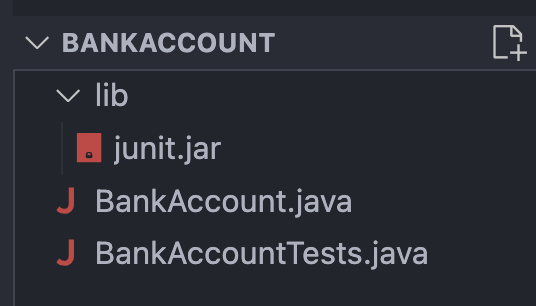
Writing Assertions
Within a Test class, you can write any number of Test methods, the anatomy of which is like so:
@Test
public void testCaseName() {
    assertEquals(expectedOutput, methodCall)
}
That @Test before the method is referred to as a decorator, which just tells Junit which methods to run as tests. All test methods should be void as they return nothing, and public as they need to be seen and executed by an external class.
The assertEquals() is one of many JUnit assertion methods: each of these lines usually has two arguments (with some exceptions we’ll get to later): the first argument is usually whatever expected output you want from the unit of code you’re testing, and the second is usually some method call with some inputs that will execute and then return the information you want to compare.
This article has a great breakdown of the other assertions you’ll commonly use:
Okay! Now we can write some tests. Let’s start by just testing exactly what we did earlier with the prints.
import static org.junit.Assert.*;

import org.junit.Test;

public class BankAccountTests {

    @Test
    public void testInitialBalance() {
        BankAccount account = new BankAccount(1000);
        assertEquals(1000, account.getBalance());
    }

    @Test
    public void testPositiveDeposit() {
        BankAccount account = new BankAccount(1000);
        account.deposit(100);
        assertEquals(1100, account.getBalance());
    }

    @Test
    public void testPositiveWithdraw() {
        BankAccount account = new BankAccount(1000);
        account.withdraw(200);
        assertEquals(800, account.getBalance());
    }

}
Running Tests
Now in IntelliJ IDEA, you can run the tests one of two ways:
Your test file should show little green play buttons in the gutter next to the class signature and all method signatures:
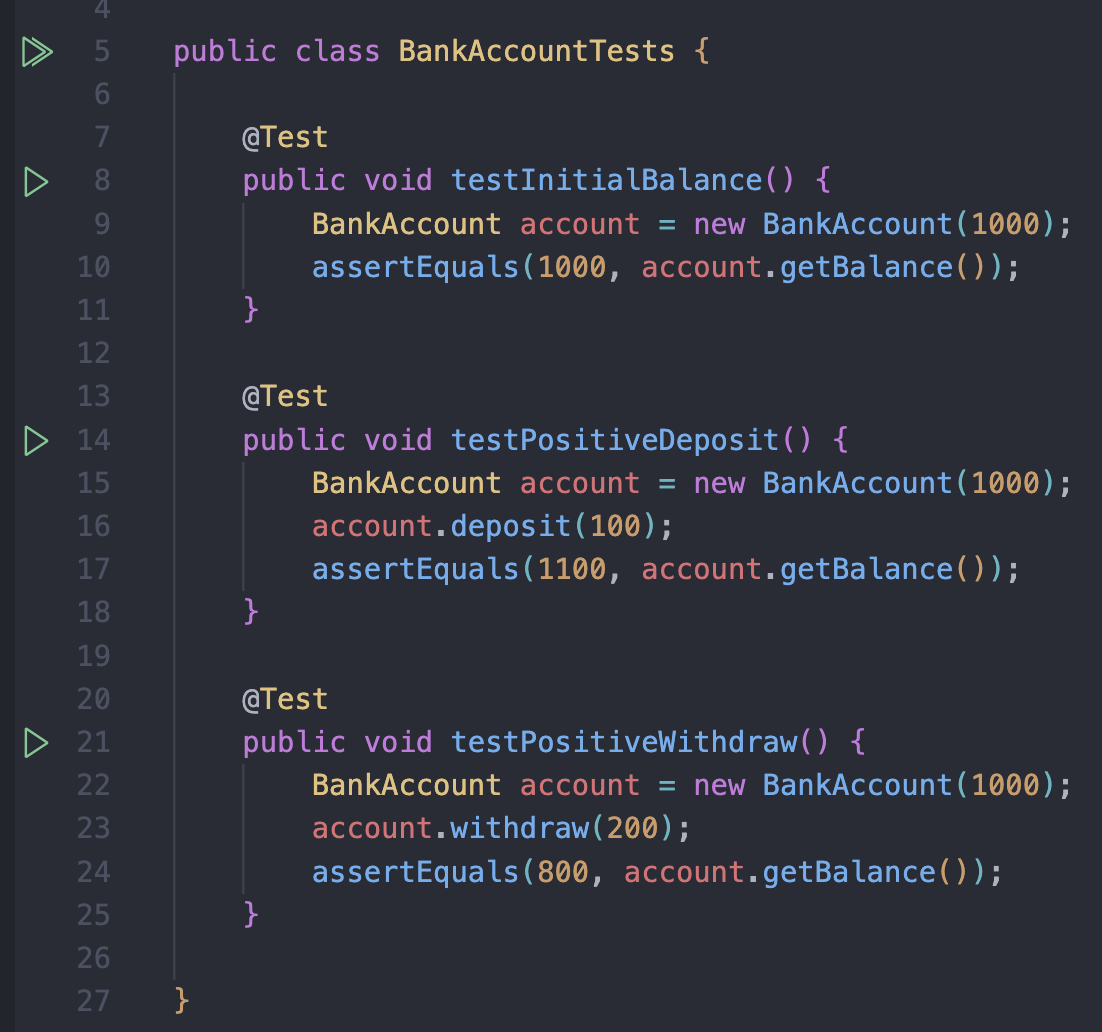
Or you can right click the test file in the Project tool window and choose Run 'BankAccountTests'.
Either way, the results open in the Run tool window at the bottom of the window: a tree of every test that ran, with a green check beside each one that passed, a red x beside each one that failed, and the assertion message for any failure. Double-clicking a failed test jumps you straight to the line that broke.
If you notice, you have the option to either run all of the tests at once, or any test individually! Neat!
Okay, so looks like our code works for those conditions, but what about withdrawing more than our account total?
@Test
    public void testOverdraft() {
        BankAccount account = new BankAccount(1000);
        assertEquals(???, account.withdraw(10000));
    }
Wait… what behavior should our code have if the user tries to withdraw more than an account’s balance?
This is an important part of Test-Driven Development! Deciding what your error conditions will be and what behavior should occur in as many cases as possible is crucial before you start writing code so you know what guardrails to put up!
In this case, I’ll just say that if the requested withdrawal exceeds the account balance, it should reject the transaction and throw new IllegalArgumentException.
What’s an IllegalArgumentException?
Let’s take a beat here to talk about Java’s Exceptions.
Sometimes in a program you as the programmer want it to crash. Maybe the user sent in bad input, or an object is in a state it absolutely should not be in, or a user tried to index into a collection object past it’s length. Oftentimes the best solution is to just crash and tell the user why.
IllegalArgumentException is the one you’ll use the most commonly as incorrect input data is the most frequent reason to force a crash, but here are some others you may use:
| Exception | When You’d Throw It |
|---|---|
IllegalArgumentException | Method receives an invalid argument (withdraw(-50) or deposit(-100)) |
IllegalStateException | Object is in an invalid state for operation (withdrawing from a closed account) |
UnsupportedOperationException | Operation not supported in this implementation (depositing to a read-only account) |
NullPointerException | Parameter must not be null (setOwnerName(null)) |
IndexOutOfBoundsException | Index out of range (accessing a transaction that doesn’t exist) |
ArithmeticException | Illegal math operation (accidental division by zero) |
With that covered, let’s get back to our code:
Writing & Testing Exceptions:
Back in our withdraw() method, let’s handle a case for an input larger than our balance:
public void withdraw(int amount) {
    if (amount > balance) {
        throw new IllegalArgumentException("Insufficient funds");
    }
    balance -= amount;
}
Now let’s go finish that test. We have to write a slightly different test to check that Exceptions are thrown
@Test
public void testOverdraft() {
    BankAccount account = new BankAccount(1000);
    assertThrows(IllegalArgumentException.class, () -> account.withdraw(10000));
}
Okay, this assertion is a little weird, but let’s break it down. Like the ones we’ve seen, it has two arguments. IllegalArgumentException.class is what it’s expecting, and () -> account.withdraw(10000) is what’s being called.
IllegalArgumentException.class is relatively self-explanatory: we’re expecting an IllegalArgumentException! The reason for the .class is because IllegalArgumentException is technically an object, so .class refers to its class information.
() -> account.withdraw(10000) is a bit more complex. () -> is called a lambda: it signifies a small piece of code to be executed, it’s basically a function wrapped up in a single line. Has no name, just runs when asked to. The assertThrows monitors this lambda. When the account.withdraw(10000) throws the exception, rather than the program crashing, the assertion grabs that exception and compares it with the one we want.
Finding Edge Cases
An edge case is a situation that occurs when a program receives some kind of extreme or unexpected input that may require special handling or a refactor of your algorithm to ensure results in the right output or error.
Learning how to identify edge cases is an important and always ongoing part of your life as a programmer. In this course I hope to impart some wisdom and skills on how to approach the process to set you up for success down the line!
Sometimes you will end up having edge cases that are particular to the problem at hand and may require some more creative thinking to realize might be an issue - but there are also some common questions and tactics for more standard edge cases that you can use as a jumping off point.
Empty/null/Zero Values
One kind of input we can get for a program that may cause issues is essentially “empty” values!
- Strings:
""is an empty input, as it is simply the empty string! For algorithms where working on strings is important, how are you handling cases where those strings may be empty? Or even just filled with space characters" "? - Integers:
0is the only thing that can be considered an empty input as far as integers are concerned, but can often be an important input to examine more closely in testing! - Arrays & Collections: Arrays, Lists, Maps, etc. can all also be empty! When I make the array
Burnymon[] burnyArray = new Burnymon[4];, I’m creating an empty Array with room for 4 Burnymon! If I don’t add any, the array looks like{null, null, null, null}. And then if I say, for example,burnyArray[0].getHealth()… wellnulldoesn’t have agetHealth()method and my code will crash! Pay attention to times when you may have a collection filled withnullvalues.
Negatives, Minimums & Maximums
This one mostly applies to numerical data, but sometimes you write a method that takes in some integer and operates on it, but the operation being done assumes the number is positive… but Integers can be negative too! Be sure to test with negative numbers!
- Usually, I like to test a function with inputs of
-1,0,1, and some large negative and large positive integer!
Your first homework has a number of methods to complete where testing with negatives is important! There are many areas where your method should reject input if it happens to be negative.
Boundaries
If your algorithm enforces some kind of boundary on its inputs or something about the algorithm changes depending on an input (like if the logic flow changes if the value is over 100), be sure to test with inputs just below, just above, and precisely at that boundary.
Arrays & Indexes
Python’s List indexer is a lot more powerful than the Array indexer in Java, and thus you may end up with IndexOutOfBounds exceptions more frequently than you expect.
Be sure to toy around with Array inputs:
- Did you know you can make an Array of length 0 in Java? Give it a shot! It’s real! Test to see how your code interacts with a zero-size Array!
- Arrays of length 1 also end up being pretty useful in edge case testing, especially when you’re toying around with custom iteration schemas.
If you find yourself writing code where you end up writing something like
arr.length - 1orarr.length + 1in a loop, test that section with some Arrays of size 1 and 0 - you may find some uncovered issues in your code!The same is true if you’re in a for-loop for an array and you’re indexing with
i+1andi-1… on very short Arrays you could run into more index errors!
Let’s put these lessons into practice and find the rest of the potential situations that could go wrong in this BankAccount…
First, a review of the state of our program:
public class BankAccount {

    private int balance;

    public BankAccount(int initialBalance) {
        balance = initialBalance;
    }

    public void deposit(int amount) {
        balance += amount;
    }

    public void withdraw(int amount) {
        if (amount > balance) {
            throw new IllegalArgumentException("Insufficient funds");
        }
        balance -= amount;
    }

    public int getBalance() {
        return balance;
    }
}
So far, we’ve deduced that asking to withdraw an amount of money larger than the amount of money we have is an error condition (hey, there’s a boundary edge case!).
What other error conditions exist in our
BankAccount? (hint: think about the mathematical definition of the term integer, and how that interacts with our notion of money)Negative inputs! If we try to deposit a negative amount of money, it’ll end up decreasing the money in our account, and if we try withdrawing a negative amount of money, it’ll increase our balance!
And for that matter, what if we try a negative value for the
initialBalanceitself?
Well, that’s a lot of good error conditions to check! Before we start writing the code to solve that problem, let’s write our tests first:
@Test
public void testNegativeDeposit() {
    BankAccount account = new BankAccount(100);
    assertThrows(IllegalArgumentException.class, () -> account.deposit(-50));
}

@Test
public void testNegativeWithdraw() {
    BankAccount account = new BankAccount(100);
    assertThrows(IllegalArgumentException.class, () -> account.withdraw(-50));
}

@Test
public void testNegativeInitialBalance() {
    assertThrows(IllegalArgumentException.class, () -> new BankAccount(-1000));
}
And now let’s fix our code to conform to our new requirements:
public class BankAccount {

    private int balance;

    public BankAccount(int initialBalance) {
        if (initialBalance < 0) {
            throw new IllegalArgumentException("Initial balance cannot be negative");
        }
        balance = initialBalance;
    }

    public void deposit(int amount) {
        if (amount < 0) {
            throw new IllegalArgumentException("Deposit amount cannot be negative");
        }
        balance += amount;
    }

    public void withdraw(int amount) {
        if (amount > balance) {
            throw new IllegalArgumentException("Insufficient funds");
        } else if (amount < 0) {
            throw new IllegalArgumentException("Withdraw amount cannot be negative");
        }
        balance -= amount;
    }

    public int getBalance() {
        return balance;
    }
}
Extra Tips
Did you notice that we repeated a particular line a lot in our tests?
BankAccount account = new BankAccount(1000);Because every JUnit test is run in isolation, we have to make a fresh account every time. Which is fine, but, JUnit offers a pretty clean way to avoid this!
BankAccount account;

@Before
public void setUp() {
    account = new BankAccount(1000);
}
@Before is a decorator in JUnit that tells it to run whatever code is contained therein before every single test. So now, instead of writing the line creating a new account in every test, we can start each one assuming that a fresh test already exists for us!
Important Note:
Notice that
BankAccount accountis outside of thesetUpmethod, in the fields region of the test file. This is because the variable needs to be accessible to all test methods.
I also want to circle back to the part where I said int was technically the wrong type for a BankAccount, and we should be using double instead. The reason I glossed over this is because writing an assertEquals with doubles is a bit more annoying.
Because
doubleandfloatonly exist to a certain level of precision, and sometimes we are okay with values that are not precisely correct and may have some margin for error, this is built-in to how JUnit understands assertions using them.
An assertEquals using decimal numbers includes one extra argument: the delta, or the margin for error.
@Test
public void testInitialBalance() {
    assertEquals(1000, account.getBalance(), 0.0);
}
Now I can note that, since we are dealing with financial transactions, there is no margin for error in terms of accuracy.
With both of those changes implemented, here’s what our code looks like now!
public class BankAccount {

    private double balance;

    public BankAccount(double initialBalance) {
        if (initialBalance < 0) {
            throw new IllegalArgumentException("Initial balance cannot be negative");
        }
        balance = initialBalance;
    }

    public void deposit(double amount) {
        if (amount < 0) {
            throw new IllegalArgumentException("Deposit amount cannot be negative");
        }
        balance += amount;
    }

    public void withdraw(double amount) {
        if (amount > balance) {
            throw new IllegalArgumentException("Insufficient funds");
        } else if (amount < 0) {
            throw new IllegalArgumentException("Withdraw amount cannot be negative");
        }
        balance -= amount;
    }

    public double getBalance() {
        return balance;
    }
}
import static org.junit.Assert.*;
import org.junit.Before;
import org.junit.Test;
public class BankAccountTests {
BankAccount account;
@Before
public void setUp() {
account = new BankAccount(1000);
}
@Test
public void testInitialBalance() {
assertEquals(1000, account.getBalance(), 0.0);
}
@Test
public void testPositiveDeposit() {
account.deposit(100);
assertEquals(1100, account.getBalance(), 0.0);
}
@Test
public void testPositiveWithdraw() {
account.withdraw(200);
assertEquals(800, account.getBalance(), 0.0);
}
@Test
public void testOverdraft() {
// BankAccount account = new BankAccount(1000);
assertThrows(IllegalArgumentException.class, () -> account.withdraw(10000));
}
@Test
public void testNegativeDeposit() {
BankAccount account = new BankAccount(1000);
assertThrows(IllegalArgumentException.class, () -> account.deposit(-50));
}
@Test
public void testNegativeWithdraw() {
// BankAccount account = new BankAccount(1000);
assertThrows(IllegalArgumentException.class, () -> account.withdraw(-50));
}
@Test
public void testNegativeInitialBalance() {
assertThrows(IllegalArgumentException.class, () -> new BankAccount(-1000));
}
}