Homework 4: A Tree-tise on Mind Reading
Assigned: Tuesday, November 3, 2026
Due: Tuesday, November 24, 2026 @ 11:59 PM
Watch this video for a theoretical overview of the topics for this homework: Homework 4 Primer
Have you ever wondered how Google just seems to read your mind when you search for only part of your query?
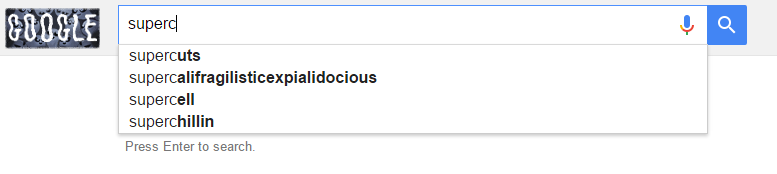
Yes, that’s right, Google was able to discern that my query was leading to “supercalifragilisticexpialidocious” (for any of you Mary Poppins fans out there).
Even more interesting, is that there’s something called “superchillin”, which I’m too afraid to research further.
As you might imagine, Google’s specific process is the combination of many complex heuristics based on your personal search history, prevailing search trends, and the linkenesses of your search compared to those that were completed successfully.
However, in this assignment, we’ll be examining a powerful tree-based data structure that can be used to efficiently perform a basic version of Google’s so-called autocomplete.
Goal: implement a simplified version of Google's text completion feature using an efficient storage for known search terms.
Choosing a Data Structure
When presented with a problem like the above, your mind might race through all of the data structures you’ve learned hoping to find one that is objectively best for the task.
Let’s review some of the putative problem requirements:
- We will be adding many search terms to our chosen data structure, which will consist of Strings representing search queries.
- Once we’ve constructed our data structure full of known search terms, we must be able to quickly look up whether any given String is contained within.
- Further, given only a portion of a String, we should be able to determine the most likely completion intended by the user.
So looking at the above, we might consider the most naive approach of storing every search term in a List and then scan through the List to find a match.
However, this is very expensive to store (doesn’t take common parts of words into account), expensive to search (linear), and does not have a clear approach to suggesting text completion.
We might next consider binary search trees, which would allow us faster storage and search for queries if we take advantage of their alphabetical order.
However, it’s still not clear how we can generate text completion results from a BST implementation…
Luckily, we can tweak a BST slightly to serve our purposes:
Tries & Ternary Search Trees
Tries (AKA Prefix Trees) are a kind of search tree in which the items stored within are unique (i.e., keys) and have overlapping prefixes (commonly with text) that is stored parsimoniously.
Ternary Search Trees are a space-efficient implementation of a Trie wherein each Node has at most 3 children with application-specific semantics for left, middle, and right children.
In our text-filler application, we want to find a parsimonious way to store words that can then be queried, and find the “closest” predicted word from only the first few letters of it.
So, we’ll adopt a ternary search tree for our purpose that has the following characteristics:
- Each node will store a letter of a word in the collection.
- The “middle” reference of every node will point to the next letter in the word, in sequence (just like a linked list).
- Because some words are actually prefixes of others (e.g., “it” is a word that is a prefix of “item”), we’ll mark certain nodes as “word ends” to indicate that letters collected along middle paths may legally terminate at them.
- The “left” and “right” references of every node are possibly None, but when non-None, will point to nodes in which other words are to be formed using the previous middle path that led up to them as a prefix.
- In particular, a node to the left of another will possess a letter of another word that is alphabetically less than the parent, and a node to the right of another will possess a letter of another word that is alphabetically greater than the parent.
- We then use these trees to form words by starting at the root and “collecting” letters along middle paths that match our query / insertion and then act like binary search when the letters do not match at a node (i.e., look to the left if the letter is “less than” the current, or to the right when the letter is “greater”).
Example
Whew! That’s a lot of words. Why don’t we actually look at an example?
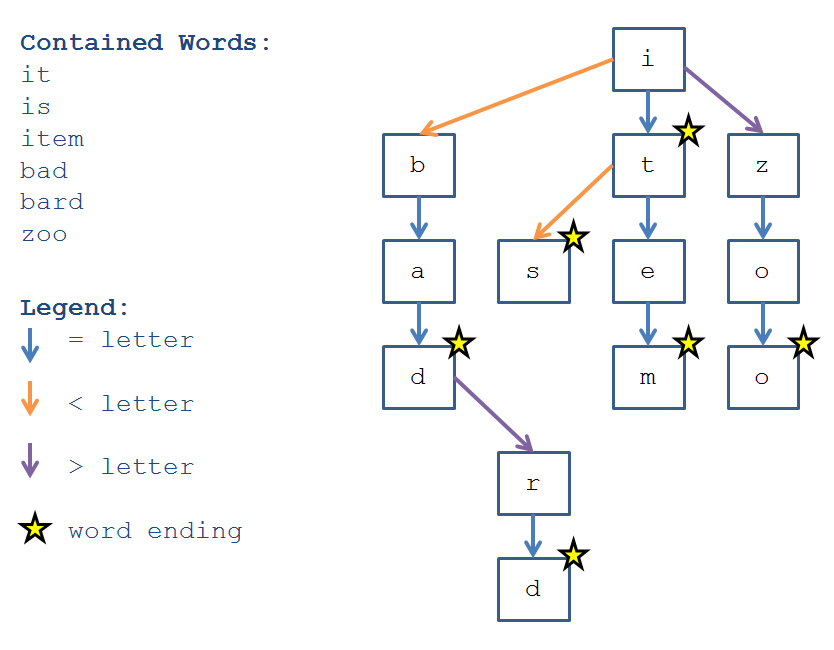
Example
Try adding another word to the above ternary tree. Where will its letters go? Which nodes will need to be marked as word ends?
Example
Determine the algorithm for querying whether a word is contained within the ternary tree above. (hint: very close to binary search!)
So now that you’ve seen the data structure, let’s connect it back to our task: to create a functioning text-filling mechanism.
The general workflow for this process will be as follows:
- Insert search terms into the ternary trie to abide by the structure detailed above.
- After search terms have been inserted, we may query the tree in a variety of ways, like checking if a term exists or asking it to fill-in the missing letters of some prefix.
Adding to a Ternary Trie
Adding to a Ternary Trie can be accomplished either recursively or iteratively, though the recursive solution is more elegant.
You can think about adding a new term to a Ternary Trie as being very similar to how we added values to a Binary Search tree:
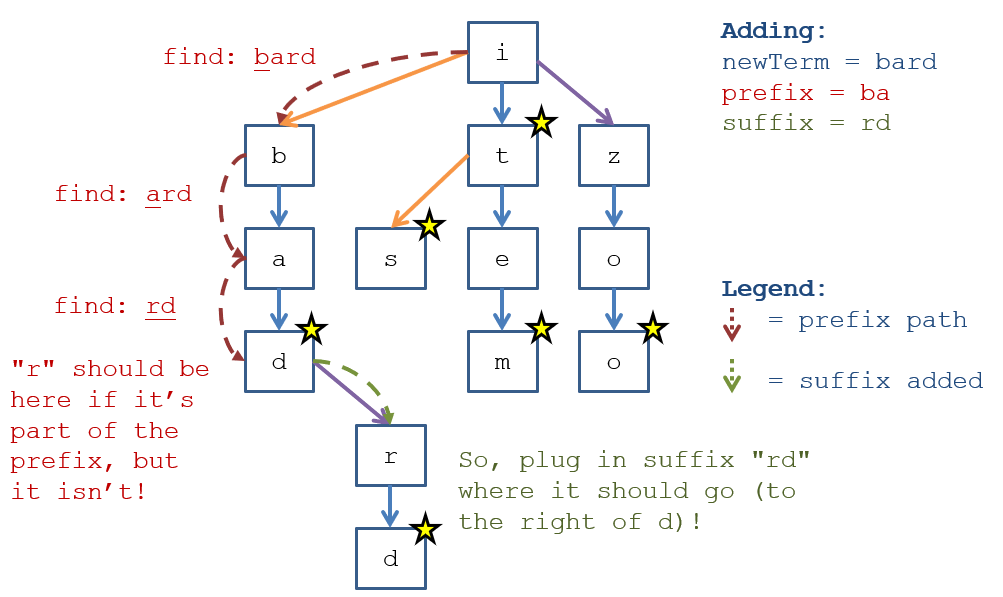
Consider any new term that you're adding as a composite of:
newTerm = termPrefix + termSuffixwhere some part of the newTerm's prefix may already be stored within the Trie, and thus, we only need to find where the unstoredtermSuffixshould go!
With this assumption, the steps are (at a high level):
- Traverse the existing Trie for as much of the already-stored prefix for the term that we want to add as we can.
- Along the way, we’ll discover one of the following cases to be true:
- The
newTermis a prefix of an existing term (in which case, we simply mark the Node corresponding with the final letter as awordEnd). - There is some part of the
newTermthat is not stored within the trie already, which will be thetermSuffix, i.e., all letters in thenewTermthat aren’t already stored in prefix-format.
- The
Example
Take the example above in which we trace the addition of the word “bard”.
Querying Ternary Trie
Performing certain queries on a Ternary Trie can be accomplished either recursively or iteratively, though the iterative solution is more elegant for operations like membership tests.
That said, querying the Trie when used for text filling can take a number of different forms:
- Ask if the tree contains a specific search term (membership test).
- Ask the tree to provide a suggested search term based on a given query string (which is possibly a fragment of a contained search term).
- Ask the tree to provide a sorted list of all contained search terms.
Example
In our example above, “bad” would be contained within the trie because, traversing it starting at the root, we follow a path that ends at a Node with a
wordEnd == true. Conversely, “ba” would not be contained within because the node associated with the left-most “a” haswordEnd == false.In our example above, asking for the autocompletion of “zo” should return “zoo” since that is the nearest
wordEndalong the prefix subtree of “zo”.
The following specification details how we will implement the behavior above.
Solution Skeleton
Start with the solution skeleton in-hand! The following will also serve as your submission mechanism (see submission instructions below).
Included in the skeleton are:
TernaryTreeTextFiller.javacontaining the skeleton of all methods you’ll need for the homework. Read on for more specifications of what to do herein.TextFillerTests.javaandTextFillerExtraTests.javato validate your solution for the file named above. The latter of the two is to test your solution to an additional optional problem that you can complete for extra credit! REMEMBER: these are not all of the tests you’ll be graded on - it’s up to you to predict edge cases and test for yourself to ensure your code is airtight. Feel free to modify these files to add your own tests.TextFiller.java, which is the interface outlining the required methods for yourTernaryTreeTextFillerclass. Do not modify!
junit.jar, a file required to run your tests. Do not touch this!.gitignorea set of patterns for git to avoid committing. You may modify this file if your commit attempts to add any project files to the repo (i.e. IntelliJ.ideaproject files or Java.classfiles, which should not be submitted)
Specifications
Implement the TernaryTreeTextFiller class that uses a Ternary Search Tree to provide the behavior described above / below.
TextFiller
Your TernaryTreeTextFiller class will implement the following interface.(individual method descriptions to follow):
public interface TextFiller {

    public int size ();
    public boolean empty ();
    public void add (String toAdd);
    public boolean contains (String query);
    public String textFill (String query);
    public List<String> getSortedList ();

}
TTNode
The node class you’ll be using, TTNode, is an inner class of the TernaryTreeTextFiller - let’s talk what that means and what you can do with it.
/**
 * Internal storage of textfiller search terms
 * as represented using a Ternary Tree (TT) with TTNodes
 * [!] Note: these are currently implemented for the base-assignment;
 *     those endeavoring the extra-credit may need to make changes
 *     below (primarily to the fields and constructor)
 */
private class TTNode {

    boolean wordEnd;
    char letter;
    TTNode left, mid, right;

    /**
     * Constructs a new TTNode containing the given character
     * and whether or not it represents a word-end, which can
     * then be added to the existing tree.
     * @param letter Letter to store at this node
     * @param wordEnd Whether or not this is a word-ending letter
     */
    TTNode (char letter, boolean wordEnd) {
        this.letter  = letter;
        this.wordEnd = wordEnd;
    }

}letterstores the singular letter associated with this node. Note that I said singular letter.wordEndis a boolean value that dictates whether this letter is the end of a word in the tree.left,mid, andrightare the references to child Nodes
Methods
int size();
Returns the number of stored terms inside of the TextFiller — synonymous with asking for the number of wordEnds at TTNodes.
boolean empty();
Returns true if the TextFiller has no search terms stored, false otherwise.
void add(String toAdd);
Adds the given search term toAdd to the TextFiller by the method specified in the Ternary Tree section above.
If the desired String toAdd already exists inside of the TextFiller, do nothing.
Note that for this simplified TextFiller, the order in which terms are added to the Ternary Tree may influence the output of the textFill method detailed below. This is fine.
Furthermore, the order in which terms are added can influence the efficiency of each operation if the tree becomes too linear. This, although not desirable, is fine given the time and difficulty expectations of the assignment (i.e., you are NOT expected to balance your tree).
All inserted search terms are to be stored in their
normalizedformat (see helper methods section below).
boolean contains(String query);
Returns true if the given query String exists within the TextFiller, false otherwise.
All query terms are to be referenced in their
normalizedformat (see helper methods section below).
String textFill(String query);
Returns any search term contained in the TextFiller that possesses the query as a prefix (e.g., “it” is a prefix of both “it” [exact match] and “item” [first two letters]).
In the event that the given query is a prefix for more than one stored search term, either are acceptable return results.
See the unit tests in the skeleton for examples of this behavior (e.g. unit test with “goad” vs. “goat”).
In the event that the given query is a prefix for NO search term, return null.
All query terms are to be referenced in their
normalizedformat (see helper methods section below).
List<String> getSortedList();
Returns an ArrayList of Strings consisting of the alphabetically sorted search terms within this TextFiller.
Alphabetic sorting is the same as how a dictionary sorts its entries, so for example, “ass” is considered a predecessor to “at” even though it has more letters.
See the unit tests below for examples of this behavior.
While you may create a list, append words to it, and return that list, you may not sort the list. You must append the words in sorted order. That shouldn't be a problem if you're adding them to your tree properly and making smart use of the traversal methods we've learned so far.
See the unit tests for examples of this behavior.
Provided Helper Methods
I have provided two helper methods to assist you in your implementation:
String normalizeTerm (String s);
Throws IllegalArgumentException(); when s is null or empty.
Used to normalize arguments to all of the assignment methods, as well as how the terms are stored.
int compareChars (char c1, char c2);
Compares two characters and returns an integer representing their alphabetical ordering. In particular:
- Returns some integer less than 0 whenever
c1alphabetically preceedsc2. - Returns 0 whenever
c1is the same character asc2. - Returns some integer greater than 0 whenever
c1alphabetically followsc2.
This method is useful for constructing and then navigating your ternary search tree.
Assumptions
To simplify this assignment, we’ll assume the following:
- You may assume there will be no punctuation, spaces, or numbers in any of the arguments to any of the above methods.
- You need make no assumptions about the order in which search terms are added to the TextFiller so long as the above requirements are met (meaning: I won’t penalize for unabalanced ternary trees).
Unit Tests
You may use the unit tests included in the following skeleton to check your understanding and correctness of your solution. Note, however, that these are not an exclusive list of tests that I will use to grade your assignment, so to ensure as many points as possible, you should add many tests to this list (including those required above) to verify correct handling of every edge case.
Good edge cases to test:
- Inserting words of various sizes, including those of 1, 2, 3, etc. letters long.
- Adding words that are prefixes of existing words in the tree, and adding words that are extensions of existing words.
- Adding a duplicate word (nothing should happen)
- Adding words that share various prefixes with others already in the tree.
Another free tip: this visualizer was incredibly helpful to me when I was testing my submission when I took this course - come up with an order of items to insert, insert them in that order, and watch the visualizer map out what the tree should look like. Very helpful when you want to design your own edge case tests but not draw out highly complex versions of a Trie.
Extra Credit
You will receive a Bonus +15 Points on this assignment for correctly completing the following extra methods!
This section has you implement a priority system for words added to the TextFiller to enable text completion into the "best" terms rather than the most immediate ones like in the spec above.
Warning: before attempting the EC, I'd suggest making either a git commit or preferably a git branch from your successful implementation of the base methods -- only attempt this after completing your required methods above, then go back to retrofit them as necessary!
The consequences of this:
- Inserted words will no longer have ending letters with just a
wordEnd, but rather, awordPriority. - Users can have a prefix autocompleted to match the best completion according to the defined
wordPriority(higherwordPriority⇒ precedence in autocompletion). - It will be up to you how to track and implement this new
wordPrioritywhile ensuring that all of the non-extra credit’s spec methods still work as intended.
Methods
Your design decisions aside, you must implement the following two methods:
public void add (String toAdd, int priority);
Same as add above, but associates a wordPriority with the given terminal word end node.
This priority will decide how the textFillPremium method (specified below) autocompletes for a given prefix.
public String textFillPremium (String query);
Returns the highest priority search term contained in the TextFiller that possesses the query as a prefix (see examples below).
In the event that the given query is a prefix for more than one equally-prioritized stored search terms, either are acceptable return results.
In the event that the given query is a prefix for NO search term, return null.
In the event that the given query is a stored term, but is only a prefix for a higher-priority term, the higher-priority term should be returned instead (see example below with “as” (priority 3) and “ass” (priority 4), in which case textFillPremium("as") => "ass").
You may assume that the given query is never null nor the empty String, or can throw an appropriate exception in these cases if you please.
Additional Constraints Apply to This Method:
- This method may not call
getSortedListor any other helper that is used to collect more than a single search term.- This method may not employ any additional data structures, like lists, sets, dictionaries.
- This method must traverse at most middle path references for characters in the best autocompletion term. For example, if
textFillPremium("it") => "itinerary"(a 9 letter completion), then at most 9 middle-path references can be traversed to find that solution (but an arbitrary number of left and right paths may be traversed due to the trie structure). This constraint will test your record-keeping abilities — be clever with your new add method to save tears here.
All query terms are to be referenced in their
normalizedformat.
Extra Credit Restrictions
Read Carefully: violating any of the following restrictions will prevent you from getting extra credit!
- You may not use any additional data structures to complete the above methods; that includes any lists, dictionaries, or sets. You may store one additional String to collect the result in
textFillPremium, but that’s it. - You may change / add any private fields of your choosing to any of the class’ components, as long as the added fields are of primitive types.
TTNode Modifications
In implementing the extra credit portion of this assignment, you may make modifications to the provided TTNode inner class to give nodes contextual data about their priorities. How you choose to do this is up to you, but I’ll give you one approach for free. Here’s how the solution modifies TTNode to implement the EC:
/*
 * Internal storage of autocompleter search terms
 * as represented using a Ternary Tree with TTNodes
 */
private class TTNode {

    int wordEndPriority, snailTrailPriority;
    char letter;
    TTNode left, mid, right;

    TTNode (char c, int wp, int st) {
        letter  = c;
        wordEndPriority = wp;
        snailTrailPriority = st;
        left    = null;
        mid     = null;
        right   = null;
    }

}
Extra Tests
You may use the following additional unit tests to verify your understanding of the extra credit as well as that of your solution.
// ...

@Test
public void testBestTerm_t0() {
  tf.add("is", 2);
  tf.add("it", 3);
  tf.add("as", 3);
  tf.add("ass", 4);
  tf.add("at", 2);
  tf.add("bat", 1);
  assertEquals(null, tf.textFillPremium("z"));
  assertEquals(null, tf.textFillPremium("zap"));
  assertEquals("it", tf.textFillPremium("i"));
  assertEquals("is", tf.textFillPremium("is"));
  assertEquals("ass", tf.textFillPremium("a"));
  assertEquals("ass", tf.textFillPremium("as"));
  assertEquals("ass", tf.textFillPremium("ass"));
  assertEquals("at", tf.textFillPremium("at"));
  assertEquals("bat", tf.textFillPremium("b"));
}

@Test
public void testBestTerm_t1() {
  tf.add("is", 2);
  tf.add("it", 3);
  tf.add("as", 3);
  tf.add("ass", 4);
  tf.add("at", 2);
  tf.add("bat", 1);
  tf.add("batch", 3);
  tf.add("irk", 5);
  tf.add("art", 5);
  tf.add("asp", 3);
  assertEquals("batch", tf.textFillPremium("bat"));
  assertEquals("irk", tf.textFillPremium("i"));
  assertEquals("art", tf.textFillPremium("a"));
  assertEquals("ass", tf.textFillPremium("as"));
}

// ...
Solution Restrictions
Read the following list of submission restrictions carefully! Violating any restriction will net you a 0 on this homework!
- You may NOT use ANY data structure from the Java collections framework in your solution with the exception of an ArrayList within the
getSortedListmethod. Elsewhere, you may not use any data structure or algorithm that you did not create yourself! When in doubt, ask. - You may NOT add any methods or fields to the TextFiller class’ public interface. You may, however, add any private fields or methods that you like.
- Your classes and therefore source files must be named exactly as intimated above (as is in the Solution Skeleton), and your submission should mimic the solution skeleton’s files structure.
Hints
The implementation of this assignment requires you to make some design decisions. However, here are some hints for how you might structure your own.
- The above methods can be implemented iteratively or using recursion, though some methods will be vastly simplified by a clever choice of one or the other.
- Want to use recursion to implement method but also want it to have different parameters? Make a private helper method and then just call that helper from the public one!
- If attempting the iterative solution on
add, consider separating the task into 2 steps: (1) finding the prefix of the newTerm already stored within, and then (2) adding any new Nodes in a subtree consisting of the remaining suffix (like the example in the first part of the spec with “bard”). - If attempting the recursive solution on
add, consider adding Nodes in a fashion similar to how we recursively added Nodes to our simple Binary Search Tree of ints during class. - Although there are only a few methods for you to implement in this assignment, beware: some of the algorithms may feel non-trivial, especially if you are unused to recursion. Leave yourself ample time to test, debug, and ask questions!
Submission
You will be submitting your assignments through GitHub Classroom!
What
Complete the source files that accomplishes the specification above in the project structure given in the skeleton.
How
To clone this assignment (if you need a refresher), consult the guide here: GitHub Classroom Tutorial
To submit this assignment:
- Simply push your final, submission copy to the GitHub Classroom repository associated with your GitHub classroom account.
- Make sure that your name is commented as the author at the top of each submitted file AND in the accompanying
README.mdfile.